
Shared Device Authentication
Key Takeaways.
Definition: Verifies individual users on devices used by multiple people.
Speed Matters: Frontline workers need access in seconds, not minutes.
Accountability Preserved: Every action ties back to a specific person.
Risk if Ignored: Shared devices become blind spots with no audit trail.
What Is Shared Device Authentication?
Shared device authentication is a method of verifying user identity on devices that many people use throughout a shift or workday. It ensures that access controls follow the individual, not the hardware, so organizations know exactly who performed each action. This approach addresses the challenges of frontline environments where workers need immediate access but cannot rely on personal devices or traditional methods such as passwords or badges. It prioritizes fast, secure handoffs while maintaining individual accountability for every session.
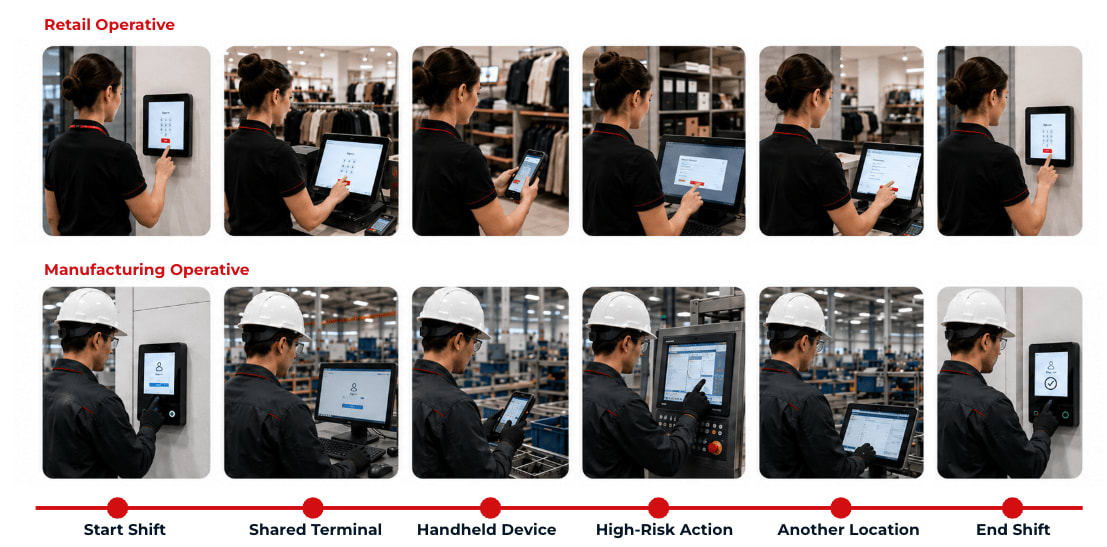
How Shared Device Authentication Works
This model is modular: you do not have to implement every capability at once. Start with biometric authentication, then add identity verification, threat protection, and orchestration as your needs evolve. Each capability builds on the previous one, helping balance speed, security, and auditability across retail floors, warehouse operations, clinical settings, and manufacturing lines.
Biometric Authentication: Workers authenticate with a single glance at any device's front-facing camera, matching their face to an existing verified identity in under a second. Delivered via Zero-Knowledge Biometrics technology, this eliminates credential sharing and phishing risk while tying every session to a specific person.
Add Identity Verification: Adding identity verification ties each biometric enrollment back to a proof of identity, such as a government ID, so you are always re-verifying the same real person. This step is not required, but it is recommended because it provides stronger authentication and higher assurance.
Add Threat Protection: Threat protection adds fraud detection that watches for risky signals, such as a device showing up in a location it should not be. When something looks wrong, it can flag or block the attempt, giving you another layer of protection beyond the login itself.
Add Orchestration: Orchestration is the final element that ties the others together. It makes it easy to build custom authentication journeys for different groups of workers, and to step assurance up or down automatically based on the risk level identified by threat protection.
Why Traditional Workforce Authentication Fails the Frontline
Most workforce authentication was designed for corporate knowledge workers: one person, one or two assigned devices, predictable work hours, and the ability to receive codes on a personal smartphone. That model does not translate to frontline operations where devices are shared among dozens of workers, shifts change every few hours, and every second of login delay affects customer service, patient care, or operational throughput.
Passwords Get Shared: When workers need quick access to serve a customer or respond to an urgent situation, they share credentials or leave accounts logged in. This can also lead to fraud—for example, a worker may tap in for a colleague as a favor or allow workers to pool resources to claim employee prizes. This destroys individual accountability and makes it impossible to know who performed a specific action.
Personal Devices Are Not Available: Frontline workers often cannot use smartphones for MFA codes. Personal phones may be prohibited on the warehouse floor, impractical in clinical settings, or simply not carried during a shift.
Session Handoffs Are Slow: Logging out of multiple applications, entering a username, typing a password, and waiting for a prompt takes time that retail associates, warehouse pickers, and healthcare staff do not have. Slow logins lead to workarounds that undermine security.
IT Support Burden Grows: Password resets and account lockouts spike when workers juggle multiple shared logins across shifts. Each reset costs time and money, and helpdesk volume increases as password fatigue sets in.
Audit Trails Break Down: When credentials are shared or sessions remain open between workers, you lose the ability to trace who did what and when. Compliance, incident investigation, and operational accountability all suffer.
Stopgap Methods Fall Short: Badge taps, radio-frequency identification (RFID) and near-field communication (NFC) cards, personal identification numbers (PINs), one-time passwords (OTPs), and single sign-on (SSO) can speed up access, but on their own they do not reliably tie each session to a specific person. Badges get shared or borrowed and codes get passed around, so accountability still slips.
What Shared Device Authentication Should Accomplish
Authentication on shared devices should make access fast and simple while delivering confidence in who is actually using the device at any given moment. The goal is individual accountability on shared devices: every session, every transaction, and every data access tied to a verified person. When it works correctly, you gain the security benefit of knowing exactly who is logged in without the productivity cost of slow, cumbersome login processes.
Zero-Knowledge Biometrics is the first step to delivering strong authentication for these frontline environments. Employees sign in on any shared device in under a second with one look at the camera. Facial biometrics are compared to those captured during onboarding, confirming that the person logging in is the same person originally verified. Critically, biometric data is never stored in retrievable or reconstructable form, which eliminates the risk of a centralized biometric database breach.
This approach provides phishing-resistant, privacy-preserving authentication that scales across thousands of shared devices without requiring workers to remember passwords or carry tokens. Because verification happens against a cryptographically protected representation rather than a stored biometric template, even a breach of the authentication system would not expose usable biometric data. The result is strong identity assurance combined with the speed frontline operations demand.
Best Practices for Shared Device Authentication
Eliminate Device-Bound Accounts: Verify every worker instead of a single "kiosk" or "front desk" credential that everyone reuses. Establishing a verified identity is the strongest way to ensure accountability.
Centralize Policy Management: Manage authentication rules for every device, location, and app from one platform rather than configuring endpoints one at a time. Central control keeps a busy store from ending up with weaker settings than a quiet one.
Audit and Prune Access Regularly: Schedule periodic reviews of who is enrolled, remove people who have left or changed roles, and confirm audit logs are complete and retained. This governance rhythm catches stale access that real-time checks are not designed to find.
Standardize the Experience Across Sites: Deploy the same sign-in flow everywhere so workers who move between stores, floors, or facilities never relearn how to log in. A familiar experience shortens training and keeps people using the approved method by default.
Frequently Asked Questions
Shared device authentication is not a single authentication method. It is an approach for environments where many workers use the same device, such as a kiosk, point-of-sale terminal, or shared workstation. Each worker authenticates individually so access controls and audit trails follow the person—not the hardware. This makes it essential for frontline environments where workers need fast access without sacrificing security.
Passwords and badges fail on shared devices because workers share them to save time, write them down, or leave sessions logged in between handoffs. This destroys individual accountability and creates blind spots where no one knows who performed a given action.
Biometrics work on shared devices through privacy-preserving approaches like Zero-Knowledge Biometrics, which use advanced cryptography to authenticate identity without storing raw biometric data in reconstructable form. The system compares a live capture to a secure, non-reversible representation created during onboarding, confirming the same person without creating a database that attackers could exploit. This provides strong identity assurance while eliminating the risk that a breach would expose usable biometric information.
Multiple users can securely share one device when each person authenticates individually before gaining access. The addition of methods like biometric identity verification can then link every session to a verified identity, maintaining full audit trails and ensuring access permissions follow the person, not the device. Organizations can support dozens of workers on a single shared device while keeping the accountability they would expect from individually assigned hardware.
Start Today
Contact Sales
See how Ping can help you deliver secure employee, partner, and customer experiences in a rapidly evolving digital world.