
SAML
SAML (Security Assertion Markup Language) is an open authentication standard that makes single sign-on (SSO) to web applications possible. SSO allows users to sign on to multiple web-based applications and services using a single set of credentials. Designed to simplify user sign-on experiences, SAML is most widely used in enterprise organizations and allows users to access applications and services that they pay for.
Most importantly, SAML sign-on experiences are secure because user credentials are never transmitted. Instead, they’re handled by identity providers (IdPs) and service providers (SPs):
The IdP stores all of the user credentials and information necessary for authorization and provides it to the SP, when requested. It's the IdPs’ job to say, “I know this person, and they should be able to access these resources.”
The SP hosts the applications and services that users want to access. These applications or services might include email platforms, such as Google or Microsoft Office, or communications apps, such as Slack or Skype. It’s the SPs’ job to say, “You can access these applications or services for a specified period of time without having to sign-on again.”
When users attempt to access these applications or services, the SP asks the IdP to verify their identities. The IdP issues SAML assertions, or tokens, which contain the information necessary to confirm user identities, including the time the assertions were issued and the conditions that make the assertions valid. After they’re received, the SP gives users access to the resources they requested.
You can compare a SAML sign-on experience to that of checking out a library book:
You find a book that you want to read and take it up to the counter.
The librarian asks if you have your library card. You say, "No, I just moved to town." The librarian says, "Well, I can't let you check out the book until you have a library card. Go over to the desk and have the assistant librarian make you a card so that we have a record of who you are."
You go to the desk and give the assistant librarian your driver's license. The assistant librarian enters your name and address into the library system, creates the card, and hands it to you. You take the card back to the librarian, who scans it and checks out the book for you. You can now take the book home for a specified period of time.
In this scenario, you authenticate with the assistant librarian (IdP) by showing them your ID. Then, the assistant librarian (IdP) creates the card using your information. When you present the library card to the librarian (SP), they use the card to check out the book for you.
This short video provides additional examples of how SAML is used to quickly and securely connect employees, partners, and customers to an organization's digital resources.
Whether you're an enterprise with employees accessing critical applications, Or a business offering Web and Mobile software and services to the marketplace, The cloud is changing the way IT infrastructure is accessed and utilized.
Today, as employees, partners, and customers increasingly rely on cloud applications to Conduct business, they inevitably accumulate numerous and often weak passwords to access There are dozens of cloud applications.
The proliferation of these non-standardized cloud identities, Many of which are forgotten, lost, and easy to steal, adds significant corporate risk and management expense, while also frustrating users.
To help secure Cloud identities, many of today's cloud-based applications increasingly Use a standard known as Security Assertion Markup Language, or SAML.
SAML is a secure XML-based communication Mechanism that shares identities between multiple organizations and applications.
But SAML's power in the cloud is its ability to eliminate most passwords and enable single sign-on Single sign-on.
Single sign-on with SAML gives faster, Easier, and trusted access to cloud applications without storing passwords or Requiring users to log into each application Individually.
Instead of passwords, applications that use SAML accept secure tokens.
Which only reveal what is needed for access to the application.
Since no passwords exist, there is nothing for customers, partners, or employees to forget, lose, or have stolen.
For SAML to work, there are three entities involved.
First is the Identity-Provider-IDP.
An Identity-Provider-IDP maintains a directory of users and an authentication Second is the Service-Provider-SP.
Service Providers run the target website, application, or service.
Identity and Service Providers may be separate organizations, such as when an employee accesses an external cloud application like Salesforce.com, or when consumers access Comcast for online content from programmers like HBO or ESPN.
The third entity is the user who has a known account with the Identity Provider.
SAML simplifies the relationship between these entities and strengthens the security of their Interactions.
A user signs into their company network with Corporate credentials.
When they click a link to access applications or secured content at the Service-Provider-SP's application, the Identity-Provider-IDP generates a SAML token to be sent to the Service-Provider.
The token grants access to APPs and content, but it does not pass any info that could be used by anyone else to access them.
The user is free to navigate securely across the applications they need.
A properly architected and deployed SAML 2.0 solution increases security by eliminating Multiple weak passwords for each cloud application while streamlining the secure Access process.
It delivers substantial business value by Reducing costs and boosting employee productivity.
And it enhances customer satisfaction, all by providing one-click access to Cloud Applications.
Although SAML is one of the fundamental cloud Identity security standards, there are other standards needed to fully construct a secure Cloud identity solution.
To learn more about SAML 2.0 and other security standards, visit the Resource Center at PingOne identity.com.
How does SAML work?
SAML is an XML-based framework, which means it's extremely flexible, can be used on any platform, and can be transmitted by a variety of protocols including HTTP and SMTP. Federation partners can choose to share whatever information they want in a SAML assertion as long as the information can be represented in XML.
A typical SAML authentication process works this way:
- The user signs on and requests access to the SP’s target web application or service.
- The SP requests user authentication information from the IdP.
- The IdP creates a SAML-formatted, digitally signed response that authenticates the user. This response can be in the form of a SAML assertion or a SAML token. The response can also include information about user privileges.
- The IdP signs the assertion and sends it to the SP.
- The SP retrieves the assertion, ensures that it’s valid, and authenticates the user.
- The user accesses the service provider’s application or service.
SAML sign-on experiences are secure because user credentials are never transmitted. SAML assertions, or tokens, are used instead.
What are SAML assertions?
SAML assertions are XML documents sent from an IdP to an SP that identify users, contain pertinent information about them, and specify their privileges in the target application or service. These messages also provide assurances that the information is valid and specify how long users can access these resources without having to sign-on again.
SAML assertions are primarily used for authentication purposes, but they can also include authorization information:
- Authentication assertions: Identify users and provide sign-on information, including the time sign-on occurred and the method used to authenticate.
- Attribute assertions: Contain user attribute information that exists in both the IdP and SP directories and is matched during the authentication process.
- Authorization assertions: Indicates whether the user is authorized to access the application or service.
SAML is widely used in enterprise organizations to share identity information between existing IAM systems and web applications. The ways that these processes are implemented depend on the ways sign-on processes are initiated -- either through the IdP or the SP.
IdP-initiated SSO
IdP-initiated SSO is often found in workforce solutions. The steps involved in this type of process are outlined in the following diagram.
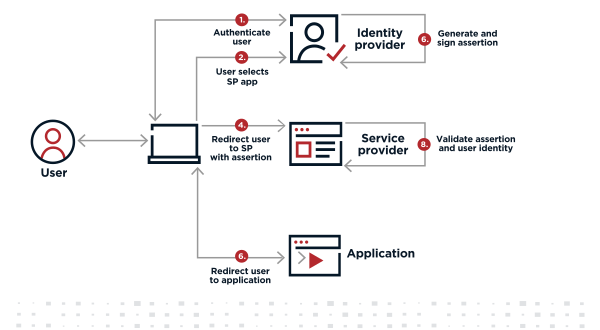
- A user signs on to their system with a username and password and is presented with an application catalog that displays icons representing the web-based applications and services they can access.
- The user clicks an icon to access one of those applications or services.
- The IdP creates and signs an SAML assertion that includes information about the user’s identity, along with any other attribute information that the IdP and SP agreed to share to authenticate users.
- The IdP either sends the assertion to the SP through a browser or sends a reference to the assertion that the SP can use to securely retrieve the assertion.
- The SP validates the signature to ensure that the SAML assertion really came from its trusted IdP and that none of the values in the assertion have been modified. It also extracts the identity, attribute, and authorization information it needs to determine whether access should be granted and which privileges the user will have.
- Users access the application or service.
SP-initiated SSO
SP-initiated SSO begins when a user tries to access an application or service directly, instead of authenticating through the IdP first. The steps involved in this type of process are outlined in the following diagram.
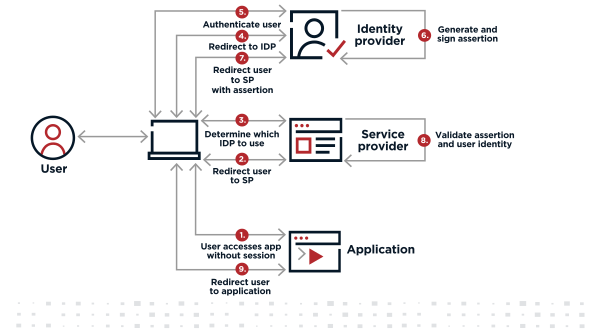
- The user attempts to access the application or service.
- The SP redirects the user back to the IdP to be authenticated and provides the user with a resource URL to access the application or service after they’re authenticated.
- The SP determines which IdP the SP should use to authenticate the user. Common methods include:
The SP might ask the user for their email address and use the domain of the email, such as bill@pingidentity.com, to identify the appropriate IdP.
The SP might display a list of IdPs it supports and ask the user to select the appropriate one.
The resource URL might be specific to one IdP.
The SP might have placed a cookie containing IdP information in the user’s browser the first time the user successfully signed on from the IDP and will use this information for subsequent access.
- The SP redirects the user to the appropriate IdP.
- The IdP authenticates the user’s identity.
- The IdP creates and signs an XML-based SAML assertion that includes information about the user’s identity, along with any other attribute information that the IdP and SP agreed to share to authenticate users.
- The IdP either sends the assertion to the SP through a browser, or sends a reference to the assertion that the SP can use to securely retrieve the assertion.
- The SP validates the signature to ensure the SAML assertion really came from its trusted IdP and that none of the values in the assertion have been modified. It also extracts the identity, attribute, and authorization information it needs to determine whether access should be granted and which privileges the user will have.
- Users access the application or service.
SAML is only used for web applications
Because it’s an XML framework, SAML is extremely versatile. Many different SSO connections with different identity federation partners can be supported with a single implementation, which is why it’s often used in business and enterprise organizations.
However, SAML only supports SSO to browser-based applications and services. It does not support SSO for mobile applications or applications that access resources through the API.
Related
Resources
Start Today
Contact Sales
See how Ping can help you deliver secure employee, partner, and customer experiences in a rapidly evolving digital world.