
What Is Adaptive Access Control?
As organizations expand across cloud, hybrid, and on-premises environments, static access control methods can no longer keep pace with evolving security demands. Adaptive access control offers a dynamic alternative that evaluates real-time context before granting or denying access.
Understanding how it works and how it compares to traditional models is essential for any identity and access management (IAM) strategy. This guide walks you through what adaptive access control is, how it compares to role-based access control (RBAC) and other methods, and how to choose the right approach for your organization.
Key Takeaways.
Adaptive access control makes real-time, context-aware decisions rather than relying on static role assignments.
Traditional RBAC works well for stable environments but struggles with dynamic, distributed workforces.
Attribute-based access control (ABAC) and policy-based access control (PBAC) add flexibility at the point of access.
Organizations that ignore adaptive models face increased risk of over-provisioned access, compliance gaps, and security blind spots.
The sections below define adaptive access control, explain how it compares to RBAC and other traditional methods, and outline how to choose the right model for your organization. Each section builds on the last to give you a complete view of modern access control.
What Is Adaptive Access Control?
Adaptive access control is an authorization approach that adjusts access decisions dynamically based on contextual factors such as user behavior, device posture, location, and risk signals. Unlike static models that grant permissions based solely on a user's role, adaptive access control continuously evaluates conditions surrounding each access request.
This approach draws on principles from both ABAC and PBAC, combining attribute evaluation with centralized policy enforcement. It also incorporates real-time risk analytics, enabling the system to step up authentication requirements or deny access outright when anomalies are detected.
Adaptive access control aligns directly with Zero Trust principles. Rather than assuming trust based on network location or a one-time login, it treats every access request as an opportunity to verify identity, context, and intent. The result is a security posture that evolves with each interaction.
How Adaptive Access Control Works
Adaptive access control operates through a continuous cycle of signal collection, risk evaluation, and policy enforcement. Rather than making a single access decision at login, the system evaluates conditions throughout each session.
Signal collection: The system gathers contextual data from multiple sources, including identity providers, device management platforms, network telemetry, and threat intelligence feeds.
Risk evaluation: A risk engine scores each access request based on factors such as user behavior patterns, device health, geographic location, and time of access. Anomalies increase the risk score.
Policy enforcement: A centralized policy engine evaluates the risk score alongside defined business rules. Low-risk requests pass through. Elevated risk triggers step-up authentication or conditional access.
Access decision: The system grants, restricts, or denies access based on the combined evaluation. Restricted access may include read-only permissions or time-limited sessions.
Continuous monitoring: After granting access, the system continues to monitor user behavior and environmental conditions. If risk levels change mid-session, access can be adjusted or revoked in real time.
This continuous cycle is what separates adaptive access control from static models. It treats trust as something that must be earned and re-evaluated at every interaction, not granted once and forgotten.
Why Adaptive Access Control Matters
Static access control models were designed for a time when users, devices, and applications lived inside a defined network perimeter. That perimeter no longer exists. Remote work, cloud adoption, and the proliferation of connected devices have made it essential for access decisions to reflect current context rather than outdated role assignments.
Reduces over-provisioned access: Dynamic evaluation prevents users from retaining permissions they no longer need.
Strengthens compliance: Full context logging provides auditors with risk-justified access records.
Improves user experience: Low-risk access stays frictionless while high-risk requests trigger additional verification.
Supports Zero Trust: Continuous verification at every access point aligns with modern security frameworks.
The benefits are clear, but realizing them requires navigating a set of practical challenges. Understanding these obstacles upfront helps you plan a more realistic implementation.
Why Adaptive Access Control Is Challenging
Adopting adaptive access control requires more than a technology upgrade. Organizations must address operational and cultural shifts alongside the technical implementation.
Data quality dependency: Effective adaptive decisions rely on accurate, real-time signals from identity stores, device management platforms, and threat intelligence feeds.
Policy design effort: Writing policies that balance security with usability takes cross-functional collaboration between IT, security, and business stakeholders.
Integration across environments: Connecting adaptive controls to legacy systems, cloud platforms, and third-party applications can be resource-intensive.
Change management: Teams accustomed to static role assignments need training and buy-in to trust dynamic, context-aware decisions.
Despite these challenges, the shift from static to adaptive models is worth the investment. The next section explains how adaptive access control compares to the most common traditional approach.
How Adaptive Access Control Differs From Traditional RBAC
RBAC assigns permissions based on predefined roles. When a user joins a department or team, they inherit a fixed set of access rights. This approach is straightforward to manage in stable environments, but it becomes a liability when access needs change frequently or vary based on context.
Adaptive access control, by contrast, evaluates each request against a range of signals. A user's role may still inform the decision, but it is only one factor among many. The table below summarizes the key differences.
Dimension | RBAC | Adaptive Access Control |
|---|---|---|
Decision basis | Predefined roles and permissions | Real-time context, behavior, and risk signals |
Flexibility | Static. Changes require role reassignment. | Dynamic. Adjusts per request without manual updates. |
Granularity | Coarse. Permissions tied to broad role definitions. | Fine-grained. Policies evaluate multiple attributes per decision. |
Real-time risk awareness | None. Permissions remain constant until changed by an administrator. | Continuous. Risk scoring triggers step-up authentication or access denial. |
Best for | Stable environments with well-defined job functions | Dynamic, distributed environments with varying risk profiles |
RBAC falls short when organizations face role explosion (too many roles to manage), when users need temporary or conditional access, or when the same role requires different permissions depending on location, device, or time of day. These limitations push organizations toward adaptive models that can account for the full picture at the moment of access.
Understanding Traditional Access Control Methods
Before adopting an adaptive approach, it helps to understand the foundational access control models that most organizations already use. Each model offers distinct strengths, and many enterprises use them in combination.
Role-based access control (RBAC)
RBAC assigns permissions to roles rather than to individual users. When someone joins an organization or changes teams, they receive the access rights associated with their new role. This makes onboarding efficient and simplifies auditing because administrators can review permissions at the role level rather than user by user.
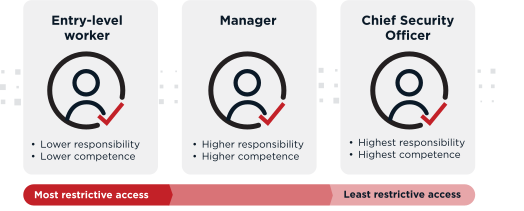
RBAC comes in several variations. Flat RBAC assigns users directly to roles with no hierarchy. Hierarchical RBAC allows senior roles to inherit permissions from junior ones. Constrained RBAC adds separation-of-duty rules to prevent one user from holding conflicting roles. Symmetric RBAC allows roles and permissions to be reviewed and adjusted bidirectionally.
Benefits: Simple to implement, easy to audit, and effective for organizations with clear, stable job functions.
Limitations: Role explosion in large organizations, difficulty handling context-dependent access needs, and inability to respond to real-time risk signals.
Attribute-based access control (ABAC)
ABAC makes access decisions by evaluating attributes associated with the user, the resource, and the environment. Instead of relying on a single role assignment, ABAC policies can consider dozens of variables before granting access.
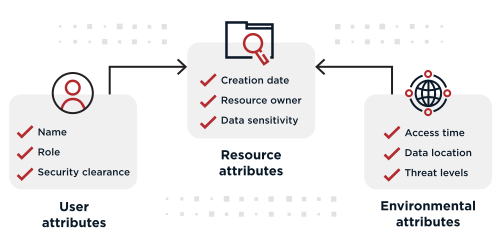
Attributes generally fall into three categories. User attributes include job title, department, clearance level, and group memberships. Resource attributes describe the sensitivity, type, or classification of the data or application being accessed. Environmental attributes capture contextual information such as time of day, device type, network location, and current threat level.
Benefits: Highly granular, reduces role explosion, and supports sophisticated access scenarios without creating new roles for every edge case.
Limitations: Requires well-maintained attribute data, can be difficult to troubleshoot when policies interact in unexpected ways, and demands careful planning to avoid policy conflicts.
Policy-based access control (PBAC)
PBAC centralizes access decisions into a unified policy engine that evaluates rules written in a declarative language. While ABAC evaluates individual attributes, PBAC focuses on the policies themselves as the primary unit of management. This makes it easier for security teams to author, version, and audit access rules across the entire organization.
The distinction between ABAC and PBAC is sometimes subtle. ABAC is the evaluation model (decisions based on attributes), while PBAC is the management model (dynamic authorization governed by centralized, auditable policies). In practice, most adaptive access control implementations use both, with policies that reference attributes alongside behavioral and risk data. Organizations that adopt policy-based authorization gain a single point of control for access decisions across applications, APIs, and data.
Adaptive Access Control in Practice
Adaptive access control delivers value across a wide range of industries and use cases. The following scenarios illustrate how dynamic, context-aware decisions improve security without adding friction for legitimate users.
Corporate and enterprise access: An employee accessing internal applications from a managed device on the corporate network receives seamless entry. The same employee connecting from an unfamiliar location on a personal device triggers a step-up authentication challenge, such as adaptive multi-factor authentication (MFA). The experience stays frictionless for low-risk access while applying additional scrutiny when risk indicators change.
Financial services: A banking customer initiating a routine balance check passes through standard authentication. When the same customer attempts a large wire transfer, the system evaluates transaction amount, device fingerprint, geographic location, and recent account behavior before deciding whether to allow, deny, or require additional verification. This protects against fraud without slowing down everyday transactions.
Healthcare: A physician accessing electronic health records (EHR) during normal hospital hours on a trusted workstation receives immediate access. If that physician attempts to view patient records from an unrecognized device after hours, the system can enforce stricter controls to help maintain compliance with regulations such as HIPAA. Continuous verification protects sensitive patient data while keeping clinicians productive.
Hybrid workforce: Organizations with employees spread across offices, homes, and co-working spaces cannot rely on network perimeter alone. Adaptive access control evaluates device compliance, user location, and behavioral patterns to make per-request decisions. This enables secure access from anywhere while reducing reliance on virtual private networks (VPNs) and static firewall rules.
These scenarios show that adaptive access control is not limited to a single industry or use case. The right model depends on your organization's specific requirements and risk profile.
Choosing the Right Access Control Model
No single access control model fits every organization. The right choice depends on your environment, risk profile, and operational maturity. The table below compares the three primary models across key decision criteria.
Criteria | RBAC | ABAC | Adaptive Access Control |
|---|---|---|---|
Ease of implementation | High | Moderate | Moderate to advanced |
Granularity | Coarse (role-level) | Fine (attribute-level) | Fine (attribute + risk + behavior) |
Dynamic risk response | None | Limited | Continuous, real-time |
Scalability | Prone to role explosion | Scales with attribute management | Scales with policy and analytics infrastructure |
Compliance support | Basic audit trails | Detailed attribute logging | Full context logging with risk justification |
Best for | Small to mid-size, stable environments | Large enterprises with diverse access needs | Dynamic, distributed, or high-risk environments |
Many organizations start with RBAC and layer in ABAC or adaptive capabilities as their environments grow more dynamic. A hybrid approach is often the most practical path forward. You might use RBAC for baseline access, ABAC for fine-grained resource-level decisions, and adaptive controls for high-risk or high-sensitivity scenarios.
When evaluating your options, consider organizational size, the diversity of your user population, how frequently access needs change, your regulatory obligations, and whether your current model can support a Zero Trust architecture. The goal is not to replace one model entirely but to combine them in a way that balances security, usability, and operational efficiency.
Best Practices for Adaptive Access Control
Moving toward adaptive access control is a process, not a one-time deployment. These operational guidelines can help you build a foundation that scales with your organization.
Start with identity: Ensure you have a centralized, reliable identity store before layering on adaptive policies.
Enforce least privilege by default: Grant the minimum access needed for each role, then let adaptive controls expand or restrict based on context.
Automate policy evaluation: Use a centralized policy engine to evaluate access decisions consistently across applications, APIs, and data stores.
Monitor and refine continuously: Review access logs, risk scores, and policy outcomes regularly to identify gaps and reduce false positives.
Align with Zero Trust: Treat adaptive access control as a core enabler of your Zero Trust strategy, not a standalone initiative.
Invest in cross-functional collaboration: Involve security, IT, compliance, and business teams in defining access policies and risk thresholds.
Following these practices helps you avoid common pitfalls and build an access control framework that grows with your organization. When you are ready to put these principles into action, Ping Identity can help.
Frequently Asked Questions
What is adaptive access control?
Adaptive access control is an authorization approach that dynamically adjusts access decisions based on real-time context such as user behavior, device posture, location, and risk signals. It goes beyond static role assignments by continuously evaluating conditions at the moment of each access request. This enables organizations to enforce security policies that respond to changing circumstances rather than relying on fixed permissions.
How is adaptive access control different from RBAC?
RBAC grants access based on predefined roles that remain constant until an administrator changes them. Adaptive access control evaluates multiple contextual factors in real time, including user behavior, device health, and environmental risk, before making each access decision. This means adaptive systems can respond to threats and changing conditions that RBAC cannot detect.
What is the difference between ABAC and adaptive access control?
ABAC evaluates user, resource, and environmental attributes to make access decisions, offering greater granularity than RBAC. Adaptive access control builds on ABAC by adding real-time risk scoring, behavioral analytics, and the ability to dynamically adjust authentication requirements. In practice, adaptive access control often uses ABAC as one input within a broader, risk-aware decision framework.
When should an organization use adaptive access control?
Organizations should consider adaptive access control when they operate in dynamic environments with remote or hybrid workforces, handle sensitive data subject to regulatory requirements, or need to support Zero Trust security principles. It is especially valuable when static role-based models can no longer keep pace with the variety and velocity of access requests across the organization.
Can you combine RBAC and adaptive access control?
Yes, and many organizations do. RBAC can serve as the baseline for standard access assignments, while adaptive controls layer on top to handle high-risk scenarios, enforce step-up authentication, and respond to anomalous behavior. This hybrid approach gives you the simplicity of role-based management with the security benefits of real-time, context-aware decisions.
Start Today
Contact Sales
See how Ping can help you deliver secure employee, partner, and customer experiences in a rapidly evolving digital world.