
What Is FIDO Authentication?
FIDO authentication is giving organizations a stronger, more user-friendly alternative to passwords. If you manage authentication for customers or employees, understanding how FIDO works will help you evaluate a smarter path forward. Built on open standards developed by the FIDO Alliance, this approach replaces traditional passwords with public key cryptography, giving you stronger security and a better user experience as part of the broader shift toward passwordless authentication. In this guide, we break down how FIDO (Fast IDentity Online) works, explain the relationship between WebAuthn, FIDO2, and CTAP2, and help you understand which protocol fits your needs.
Key Takeaways.
FIDO authentication eliminates passwords by using public key cryptography, where private keys stay on users' devices and are never shared with servers or transmitted over the network.
FIDO2 is the umbrella standard that combines two open specifications: WebAuthn (the browser and platform API) and CTAP2 (the protocol that connects authenticators to devices). Together, they enable passwordless, phishing-resistant authentication.
The FIDO Alliance drives global adoption by developing open authentication standards, running certification programs, and uniting hundreds of member companies (including Amazon, Apple, Google, Microsoft, Visa, and Ping) around a shared goal of reducing password reliance.
Three FIDO protocol generations exist today. UAF supports passwordless login, U2F adds a hardware second factor, and FIDO2 combines both capabilities while introducing passkey support across platforms and devices.
Without FIDO, password-based systems remain exposed to credential phishing, account takeover, and the operational cost of password resets, which are among the leading causes of enterprise data breaches.
What Is FIDO Authentication?
FIDO authentication is a set of open, standardized protocols designed to replace passwords with stronger, easier-to-use alternatives. Developed under the FIDO (Fast IDentity Online) framework, these protocols use public key cryptography to verify your identity without ever sending a shared secret across the network.
Here is how it works at a high level. When you register with a FIDO-enabled service, your device generates a unique key pair: a private key that stays on your device and a public key that gets sent to the service. When you sign in later, the service sends a challenge that only your private key can answer. Your device signs the challenge, proves possession of the key, and grants you access. No password is involved, and your private key never leaves your device.
The experience for you is simple. Depending on the service and your device, you might authenticate with a fingerprint, a face scan, a PIN, or a hardware security key. This is an example of biometric authentication working alongside cryptographic credentials. The underlying cryptographic exchange happens behind the scenes in milliseconds.
What Is the FIDO Alliance and its Role in Authentication Standards?
The FIDO Alliance is an open industry association founded in 2013 with a clear mission: reduce the world's over-reliance on passwords. What started as a conversation between PayPal and Validity Sensors in 2009 about using biometrics instead of passwords has grown into a global effort with hundreds of member companies spanning technology, finance, healthcare, and government. As of 2026, the FIDO Alliance reports that over five billion passkeys have been created worldwide, and 82% of organizations say fully passwordless authentication is an ultimate goal for their workforce1.
The Alliance plays three distinct roles in shaping authentication standards. First, it develops technical specifications that define how FIDO authentication protocols work. These specifications (UAF, U2F, and FIDO2) provide a shared blueprint that any organization can implement, ensuring consistency across products and platforms. Second, the Alliance runs certification programs that verify interoperability between devices, browsers, and services from different vendors. This certification process is critical for global adoption because it means a FIDO-certified security key from one manufacturer will work with a FIDO-certified service from another. Third, the Alliance collaborates with standards bodies like the World Wide Web Consortium (W3C) to ensure FIDO specifications become official web standards. The WebAuthn API, co-created by the FIDO Alliance and W3C, became a formal W3C web standard in 20192 and is a direct result of this collaboration.
Because FIDO is an open standard, it is publicly available and free to adopt, implement, and update. This openness is intentional. It encourages widespread adoption, gives developers a well-documented framework to build on, and prevents any single vendor from controlling the direction of passwordless authentication. Member companies like Amazon, Apple, Google, Microsoft, Visa, and Ping Identity contribute to the specifications and help shape the future of identity security together.
How does FIDO Authentication Work?
Every FIDO protocol follows the same two-phase pattern: registration and authentication. Understanding these two phases helps you see why FIDO authentication is resistant to phishing, credential theft, and replay attacks.
Registration. When you access a FIDO-enabled service for the first time, your device creates a new cryptographic key pair that is unique to that device, that service, and your account. The private key stays on your device. The public key is sent to the service and stored alongside your account information. If you choose a biometric method (like a fingerprint or face scan), that biometric data is used only locally to unlock the private key. It is never sent to the server.
Authentication. Each time you return to sign in, the service sends a cryptographic challenge to your device. Your device uses the stored private key to sign that challenge, then sends the signed response back. The service verifies the signature against your public key. If the signature is valid, you are granted access. Importantly, the service also checks that the domain matches the one registered during setup. This domain-binding step is what makes FIDO authentication resistant to phishing: even if an attacker creates a convincing fake login page, the domain will not match, and the authentication will fail.
All communication during both phases is encrypted, and private keys never leave users' devices. This design means there are no shared secrets for attackers to steal from a data breach.
What Is the Difference Between WebAuthn, FIDO2, CTAP2?
These three terms often appear together, which can make it hard to tell them apart. The short answer is that FIDO2 is the umbrella, and WebAuthn and CTAP2 are its two component specifications. Each serves a different role in the authentication process.
FIDO2 is the overall standard developed jointly by the FIDO Alliance and the W3C. It defines the full framework for passwordless and multi-factor authentication (MFA) using public key cryptography. When someone says "FIDO2 authentication," they are referring to the complete system that includes both WebAuthn and CTAP.
WebAuthn (Web Authentication) is a W3C web standard that defines the API browsers and platforms use to communicate with FIDO-enabled services. It is the layer that handles the exchange between the website (the relying party) and the client (your browser or operating system). WebAuthn specifies how public key credentials are created during registration and verified during authentication. Every major browser (Chrome, Firefox, Safari, Edge) supports WebAuthn natively.
CTAP2 (Client To Authenticator Protocol 2) is the specification that governs how an external authenticator (like a USB security key, a Bluetooth device, or a phone) communicates with the client platform. If WebAuthn is the conversation between the website and your browser, CTAP2 is the conversation between your browser and your authenticator. CTAP2 supports passwordless flows, multi-factor flows, and resident credentials (passkeys). Its predecessor, CTAP1, is the renamed version of the original U2F protocol and only supports second-factor authentication.
Here is how they fit together in practice. When you tap a security key to sign in to a website, WebAuthn handles the exchange between the website and your browser, while CTAP2 handles the exchange between your browser and the security key. Both must work together for FIDO2 authentication to succeed.
Component | What It Is | Scope | Maintained By |
|---|---|---|---|
FIDO2 | The umbrella standard for passwordless and MFA | Full authentication framework | FIDO Alliance and W3C |
WebAuthn | Web API for creating and verifying public key credentials | Browser/platform to relying party | W3C |
CTAP2 | Protocol for authenticator-to-client communication | Authenticator to browser/platform | FIDO Alliance |
Understanding how these three components interact provides helpful context for the broader FIDO protocol family. The Alliance has released three generations of specifications, each building on the last.
FIDO Authentication Protocols: UAF, U2F, FIDO2
The FIDO Alliance has published three generations of specifications, each built on public key cryptography. Understanding the differences helps you choose the right protocol for your organization's security requirements and user experience goals.
Universal authentication framework (UAF)
UAF enables passwordless sign-on by letting users authenticate with a method they choose during registration, such as a fingerprint, face scan, voice recognition, or PIN. The protocol creates a unique key pair for each user-device-service combination, stores the private key on the device, and sends the public key to the service.
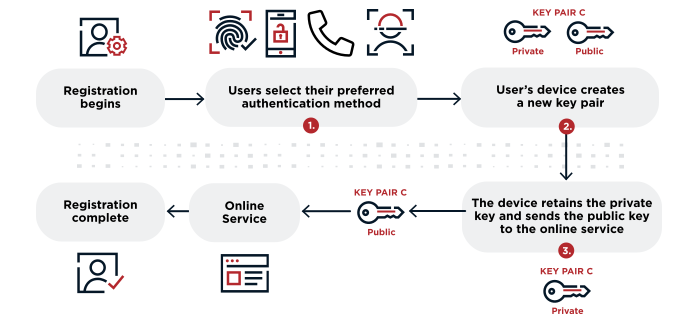
During registration:
You select an authentication method from the options the service allows.
The device generates a new key pair unique to the device, the service, and the user account.
The private key stays on the device. The public key is sent to the service to complete registration.
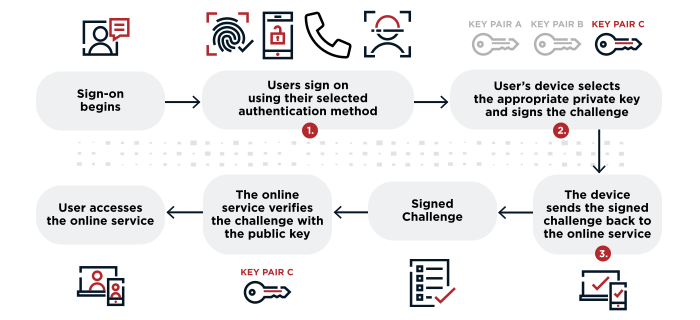
During authentication:
You provide your chosen authentication method (for example, a fingerprint) to verify your identity.
The device selects the correct private key and signs the service's challenge.
The service verifies the signed challenge with the stored public key, and you gain access.
All communication is encrypted, and private keys and biometric data never leave users' devices. UAF laid the groundwork for fully passwordless flows, a design principle the later FIDO protocols carried forward.
Universal second factor (U2F)
U2F complements traditional password-based authentication rather than replacing it. Users provide two pieces of evidence: something they know (a username and password) and something they have (a registered security key). This is a form of two-factor authentication. These security keys can use USB, NFC (near-field communication), or Bluetooth to complete the authentication process.
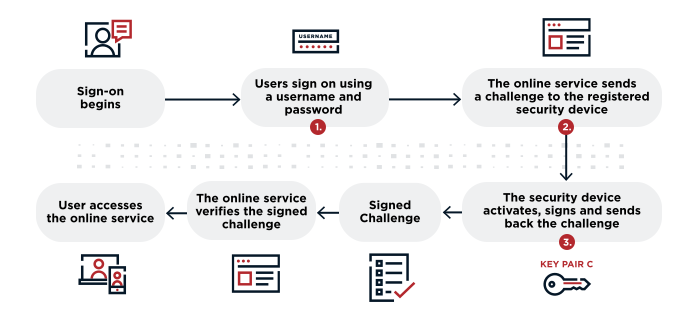
Each time a user signs in:
You enter your username and password.
The service sends a challenge to the registered security key.
The security key signs the challenge to prove possession of the private key and sends the response back.
You gain access to the service.
U2F is now formally known as CTAP1 under the FIDO2 framework, and its functionality continues as a second-factor option within the broader FIDO2 standard. It remains a valid option for organizations that have already deployed hardware keys and are not yet ready for a fully passwordless rollout.
FIDO2
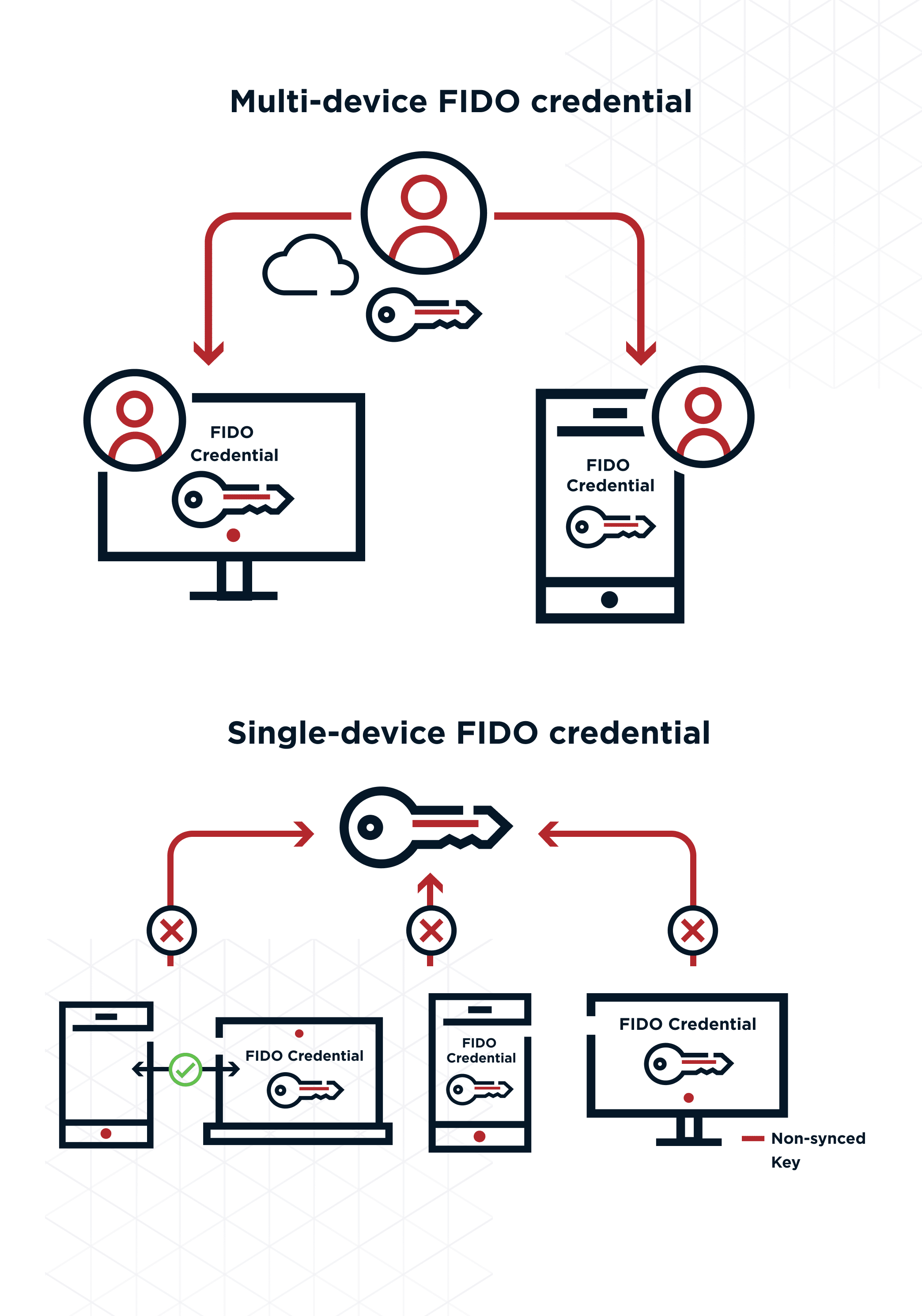
FIDO2 is the newest and most versatile generation. It combines the passwordless capabilities of UAF with the second-factor capabilities of U2F, and adds support for passkeys (device-bound or synced FIDO2 credentials supported by Apple, Google, and Microsoft). FIDO2 can provide passwordless experiences, two-factor experiences, or full multi-factor authentication (MFA) depending on what the service requires.
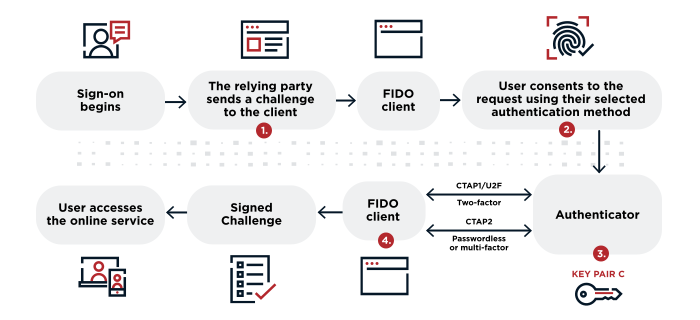
During FIDO2 authentication:
The service (the relying party, or RP) sends a challenge to the FIDO client using WebAuthn. The FIDO client could be a browser, desktop application, or mobile application.
You consent by providing your chosen authentication method. The client checks that the domain matches the one registered at setup. If it does not match, authentication fails. This is what gives FIDO2 its strong phishing resistance.
The client obtains the private key from the authenticator, which can be built into the device or be an external hardware key.
The client signs the challenge and returns the response. The service verifies the signature, and you gain access.
As with all FIDO protocols, communication is encrypted end to end, and private keys never leave users' devices.
Benefits of FIDO Authentication
FIDO authentication delivers measurable improvements across security, privacy, compliance, and user experience. Here are the key benefits you can expect when you adopt FIDO-based protocols.
Phishing resistance: FIDO binds each credential to a specific domain, so stolen credentials cannot be replayed on a different site. This makes FIDO one of the strongest defenses against credential phishing available today.
Enhanced privacy: Biometric data (fingerprints, face scans, voice patterns) stays on your device and is never transmitted to a server. This "privacy by design" approach reduces liability and aligns with privacy-first principles.
Regulatory compliance: FIDO standards support GDPR, CCPA, and PSD2 requirements. NIST's Digital Identity Guidelines (SP 800-63B) also recommend phishing-resistant authenticators based on FIDO standards3.
User convenience: Signing in with a fingerprint, face scan, or security key tap is faster than typing a password. Users no longer need to remember or reset passwords, which reduces helpdesk volume. Understanding how MFA and passwordless authentication compare can help you choose the right approach.
Lower operational cost: By eliminating password-related support tickets and reducing account recovery volume, FIDO authentication cuts the ongoing cost of managing user access.
These benefits compound as adoption grows. The more services and users you move to FIDO authentication, the more you reduce your password-related attack surface and support burden.
Frequently Asked Questions About FIDO Authentication
FIDO2 is the umbrella standard that includes two component specifications: WebAuthn and CTAP2. WebAuthn is the W3C web API that handles communication between a website and your browser or platform. CTAP2 is the FIDO Alliance protocol that handles communication between your browser and an external authenticator like a security key.
The FIDO Alliance develops open authentication specifications (UAF, U2F, and FIDO2), runs certification programs to verify cross-vendor interoperability, and collaborates with the W3C to turn those specifications into official web standards. Its member companies include Amazon, Apple, Google, Microsoft, Visa, and Ping Identity.
FIDO uses public key cryptography, which means private keys never leave users' devices and are never shared with servers. This eliminates the risks of credential theft, password reuse, and phishing because there is no shared secret for attackers to steal or intercept.
Passkeys are FIDO2 credentials that can be stored on a device or synced across devices through a platform like Apple iCloud Keychain or Google Password Manager. They use the same public key cryptography as other FIDO2 credentials, but syncing makes them available on every device linked to your account, so you do not lose access if you switch phones or laptops.
No. Biometric data used in FIDO authentication (fingerprints, face scans, voice patterns) is stored exclusively on users' devices. It is used locally to unlock the private key and is never transmitted to or stored on a server.
Yes. FIDO protocols support compliance with regulations including GDPR, CCPA, and PSD2 by keeping biometric data on-device and eliminating shared secrets. FIDO2 and U2F both provide multi-factor authentication options suitable for industries that handle sensitive data.
Yes. FIDO is an open standard, and the FIDO Alliance runs certification programs to verify interoperability across browsers, operating systems, and authenticator devices. Every major browser and platform (Chrome, Firefox, Safari, Edge, Windows, macOS, iOS, Android) supports FIDO2 and WebAuthn natively.
Related
Resources
Start Today
Contact Sales
See how Ping can help you deliver secure employee, partner, and customer experiences in a rapidly evolving digital world.