How FIDO Passkeys Will Accelerate a Passwordless Future

Aug 23, 2024
-minute read
Headshot of Adam Preis Ping Identitys Director of Product and Solution Marketing
Director, Product & Solution Marketing

Passwords have been around since the invention of computers and are still the primary way of protecting a large percentage of our infrastructure today. However, despite being the go-to method for security, digital passwords are inherently problematic and will continue to be problematic as technology becomes more advanced.


Why?


Passwords are knowledge-based, meaning they can easily be guessed or stolen. They’re also a source of user frustration, which can negatively impact employee productivity, customer satisfaction, and ultimately revenue.


All that considered, how do you reconcile this when passwords—despite their shortcomings—are really the only digital security solution society has ever known?


Good question. The answer is going passwordless, which several leading enterprises across the industry are pursuing via FIDO (Fast Identity Online) passkeys

FIDO: A Comprehensive Solution for a Passwordless Future

FIDO is an open standard that enables users to authenticate via a highly secure cryptographic login, which is phishing resistant and easy to implement. FIDO2—the latest protocol—leverages users’ physical devices to store credential information locally on secured hardware and sign authentication challenges.


The joint announcement by Apple, Google, and Microsoft to support passwordless is a clear statement that FIDO is the way to move towards a passwordless future, making it the new standard. 


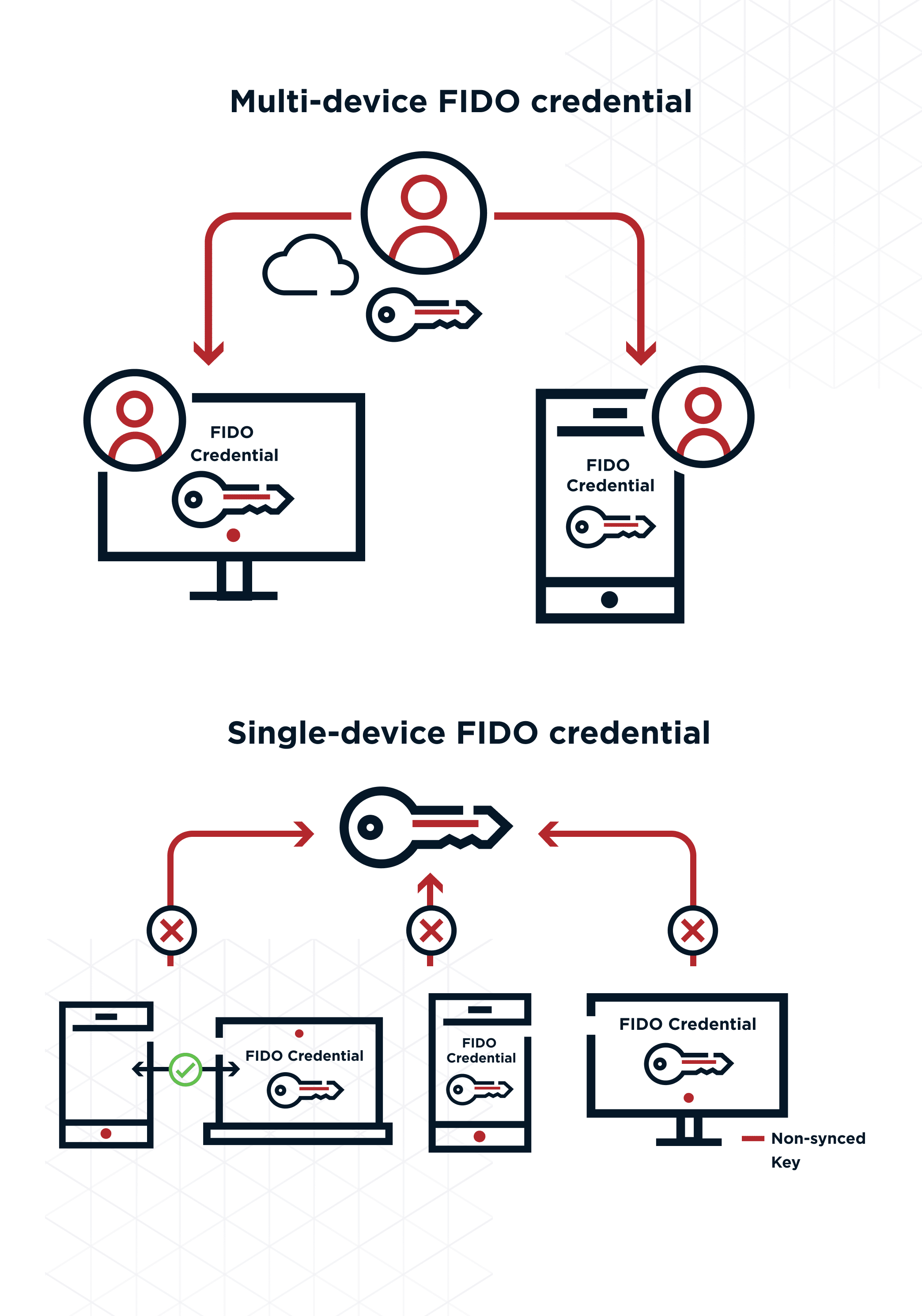
Passkeys remove the most common barriers to FIDO adoption by (1) enabling users to enroll to FIDO once, sharing the credential between devices on the same platform, and (2) being able to leverage registered FIDO devices on one platform to authenticate when logging in from another.


Getting here wasn’t without some challenges. Let’s back up a little bit to see how we got to where we are now.


Initial Headwinds with FIDO Implementation

As a cryptographic solution that is both domain-bound and hardware-bound, FIDO has a reputation as an innovative approach for replacing password-based logins with fast, convenient, and secure login experiences across websites and applications.


However, even as FIDO authentication broke new ground in the use of passwordless, there were some initial setbacks that needed to be mitigated before major enterprises would announce their support for passwordless and before it would catch on broadly with consumer and workforce users.


Here are some of those setbacks:


Registration and Usability

One of the initial problems with FIDO was that it still relied on weaker authentication mechanisms (like passwords) during the initial registration process. The first time you would register a FIDO device, you would need to bind your user authentication to that device.


This meant that if you tried to log in from another device that you owned, you would first have to authenticate yourself using an alternative method (again, most likely going back to the password) before the site or application would give you access. Then, once approved, you would need to register that new device as well to leverage FIDO on that device thereafter. This process would have to repeat on each of the devices you used for access.


It’s easy to see how FIDO’s use became tedious, discouraging organizations from giving up traditional passwords and familiar login experiences — despite their known weaknesses — in exchange for something representing only a slight improvement.


Failure to Fully Eliminate Passwords

Broadly speaking, there are three stages of password elimination:


  1. Password used in combination with other credentials to authenticate
  2. Password obscured from users but exists at backend (user may need to revert when running a recovery flow, for example)
  3. Password completely eliminated

Considering the issues with registration, FIDO only really made sense in one circumstance. For FIDO to fulfill its vision of completely phasing out passwords and eliminating the threat of common password attacks, it needed to be fully adopted as the only way for users to authenticate. In other words, the act of continuing to mix in traditional password login methods presented a barrier that ultimately led organizations to delay their adoption of passwordless.


Recovery

Furthermore, the failure to fully eliminate passwords led to recovery problems. To illustrate, organizations that pursued FIDO as the only way for their users to authenticate ended up facing issues with user account recovery. As a result, users ended up needing access to at least two previously registered FIDO devices — in case they lost one — to enable account recovery.


Otherwise, in the absence of the only FIDO-registered device that their identities were bound to, they’d be unable to access any of their accounts.


Slow Adoption

From the friction during registration to the account recovery issues resulting from the need for back-up FIDO devices (in the event of a lost FIDO-enabled device), it was hard to see the benefit that FIDO would bring to organizations and their users. This turned out to be a significant deterrent to broad adoption of FIDO.


How FIDO2 Passkeys Present a Solution

While there were problems with the FIDO standard, the FIDO Alliance developed the FIDO2 standard and, along with the World Wide Web Consortium (W3C), developed a solution to stay on track towards a passwordless future.


That’s where the introduction of FIDO2 passkeys (or multi-device credentials) came in. FIDO2 passkeys provide a more efficient way for users to enroll their FIDO devices and register for new sites during the initial setup. In addition, passkeys don’t require a tedious backup or recovery process. You can simply enroll/unenroll devices with a cloud backup from your service provider.


Advantages of FIDO Passkeys

Passkeys remove the most common barriers to FIDO adoption, which primarily had to do with the private key being tied to a particular device. Usability problems arose when a user changed mobile devices or got a new one, in which case the FIDO registration process would have to be restarted.


With passkeys, the private key can be stored in a device manufacturer’s cloud, so users can enroll to FIDO once and share the credential between devices on the same platform. So if someone has an iPhone enrolled with a passkey, that same passkey can be used with the user’s iPad and MacBook, for example. In addition, a user who has registered FIDO devices on one platform can authenticate when logging in from another, due to the use of Bluetooth proximity checks, further simplifying authentication.


Benefits For Employees


  • Instant Access: Employees can use passkeys as their single sign-on (SSO) authentication, so they can get access to all the applications and resources they need to do their jobs in an instant. And there’s the benefit of stronger security with passkeys, because credentials are never stored or transmitted between systems. Even if the authenticator device is lost or stolen, it would be nearly impossible to first gain access to the device and then to extract the passkey from the device’s encrypted vault.
  • Ease of Use: Passkeys are more secure than passwords and more convenient than multi-factor authentication. With passkeys, users don’t have to enter any credentials, submit a code sent via email or SMS, or accept a prompt from a mobile app. Instead, users simply access their chosen authenticator, which is typically a mobile phone but could be a tablet or PC. The device will ask the user to authenticate using a fingerprint, face scan, or PIN, the same simple action that they take multiple times each day to unlock their devices.
  • Simplified Network Access: Passkeys simplify network and account access for employees, because they are easy to use and work across most of a user’s devices. With passkeys, there’s no need to enroll a new FIDO credential on each service or each new device. The users’ passkeys are available whenever they need them — even if they replace their device.

Benefits for Security Teams

Passkeys are a strong defense against phishing and other social engineering attacks, such as phishing or credential stuffing. They also nullify the effects of MFA bombing, in which malicious actors try to get users to “accept” an MFA push notification. By replacing legacy, knowledge-based, phishing-prone credentialing, passkeys virtually eliminate the potential for data breaches related to credential theft.


With the increasing adoption of BYOD (Bring Your Own Device) workplace policies, FIDO passkeys can play an important role in helping companies that utilize this approach to enhance security, while simultaneously simplifying the onboarding and offboarding process. This is because unlike passwords, which can be stored on local devices, passkeys ensure sensitive credentials remain secure, and device enrollment can easily be terminated by administrators, if necessary.


In the context of a zero trust framework, passkeys align perfectly with the "never trust, always verify" mantra. Additionally, security teams can offer passkeys without requiring passwords as an alternative sign-in or account recovery method. Although users are not required to enter passwords, they still face a challenge (typically a biometric authentication on their device) ensuring secure access to systems, apps, and devices. This combination of passkeys and biometric verification strengthens security far beyond what traditional passwords offer, making it an ideal solution for employee and contractor access journeys and enterprise security.


Passkeys are scalable and easy to offer, which is why some of the world’s largest brands now support the use of passkeys — Adobe, Amazon, PayPal, TikTok, Nintendo, WhatsApp, eBay, and Uber, to name a few. Websites can enable FIDO passkeys for their customers through a simple API that is supported across leading browsers and platforms on billions of devices consumers use every day.

How Do FIDO Passkeys Work?

Passkeys accelerate FIDO adoption within enterprises by lowering the technology’s barrier to entry. FIDO credentials are no longer bound to a specific device, but rather are automatically synced to the cloud. This makes them reusable across the multiple devices that a user may own on the same platform, making enrollment and account recovery simpler and more resilient.


Another significant barrier to FIDO adoption that passkeys resolve is through their ability to share credentials across different vendor platforms. For example, by scanning a QR code on one platform, users can authenticate by using their trusted identity credentials from a different platform. This is accomplished via Bluetooth proximity checks and further streamlines authentication and enhances cross-platform interoperability.


But it doesn’t end there. The adoption of FIDO and the phasing out of passwords is a large initiative and we are now seeing the consideration of more promising improvements. Some of those improvements are meant to address requirements from different sectors in the market. Others plan to create an easy, secure, and familiar user experience by embedding FIDO digital credential authentication into the browser password manager, making the authentication experience a no-brainer for users to act on.

Passkey Adoption Considerations

FIDO passkeys are a new and exciting step towards a passwordless future. But no two organizations are exactly alike, so there are several factors that should be considered before embarking on passkey adoption.


  1. Passkeys are stored in the cloud and therefore require a thorough review of your cloud security controls.


  2. Passkeys are managed by the supporting platform, e.g., Google, Microsoft, Apple, etc. Therefore, organizations must be comfortable with a third party playing an active role in their users’ authentication and requiring users to enable cloud backup on their devices.


  3. FIDO servers are still required to begin leveraging passkeys. These servers are not provided by any of the supporting platforms.

In addition, when considering the adoption of passkeys and FIDO in general, organizations must consider the fact that FIDO is an evolving standard that has different phases of implementation maturity across different platforms and browsers. As a result, organizations should be fully prepared for supportability and user experience challenges and ready to adapt accordingly.

How Ping Can Help Jumpstart Your Passwordless Journey

A member of the FIDO alliance, Ping Identity also offers top-tier FIDO services for various passwordless scenarios. Supporting all announced OS and browser providers for passkeys' initial release, Ping Identity ensures interoperability across these ecosystems through its orchestration platform, PingOne DaVinci. Furthermore, passkeys will create a broader and more robust foundation for the services Ping provides.


In assisting organizations with their passwordless initiatives, Ping Identity covers all use cases across identity types. Additionally, by harnessing passkeys, we strengthen identity security with risk and fraud indicators.


To learn more about best practices related to deploying passwordless in your organization, including FIDO2 and passkeys, check out Ping Identity’s Passwordless Solution.


A passkey is a type of digital credential stored on a phone or computer that’s used for authentication without passwords. Instead, a passkey uses a pair of cryptographic keys, one public and one private, based on the FIDO WebAuthn standard. The public key is housed within a website or service, and the private key is stored in a device’s encrypted memory or the device manufacturer’s cloud. The private key “unlocks” online accounts, but the server with the public key never “sees” the passkey — it only confirms that the user is the owner of the passkey by having that user unlock the device, typically through biometrics.

The FIDO standard sought to reduce people’s reliance on passwords, which would eliminate phishing. FIDO also increases the security of multi-factor authentication. But challenges, like having to re-enroll each new device and difficulty recovering passkeys from lost or stolen devices, hindered FIDO adoption, particularly among consumers. In response, the FIDO Alliance and the W3C working group developed a new version of the WebAuthn specification, known as FIDO2.


FIDO2 removes the limitations of a passkey being tied to a particular device. It uses Bluetooth to enable a user’s smartphone to become a roaming authenticator. This means that if a user is signing into an account using a laptop, the laptop can communicate with the user’s phone in physical proximity to authenticate. FIDO2 also enables multi-device credentials, meaning that a FIDO credential can survive the loss of a device since it is stored in the device manufacturer’s cloud and not on the device itself.

Two-factor authentication (2FA) and multi-factor authentication (MFA) are vast improvements over the single username/password combination, which has been subject to a range of attacks, including phishing, and is a leading cause of data breaches. But MFA is not without its problems. It can be inconvenient, requiring users to access a second device and enter a code or open an email client to access a magic link. It can also have security issues, because the most widely used second factor — one-time passcodes (OTPs) — can be phished or intercepted, and push authentication is subject to prompt bombing.


With passkeys, there is no password, so there’s no threat of social engineering types of attacks, like phishing or MFA prompt bombing. For this reason, passkeys are more secure than most MFA approaches. Also, they are far more convenient to use — users can authenticate simply by unlocking their phone.

Share this Article:
Related Resources

Start Today

See how Ping can help you deliver secure employee, partner, and customer experiences in a rapidly evolving digital world.