Magic Link Authentication: What It Is, How It Works, and When to Use It

Nov 22, 2023
-minute read
Last Updated: Feb 4, 2026
Senior Director, Product & Solution Marketing

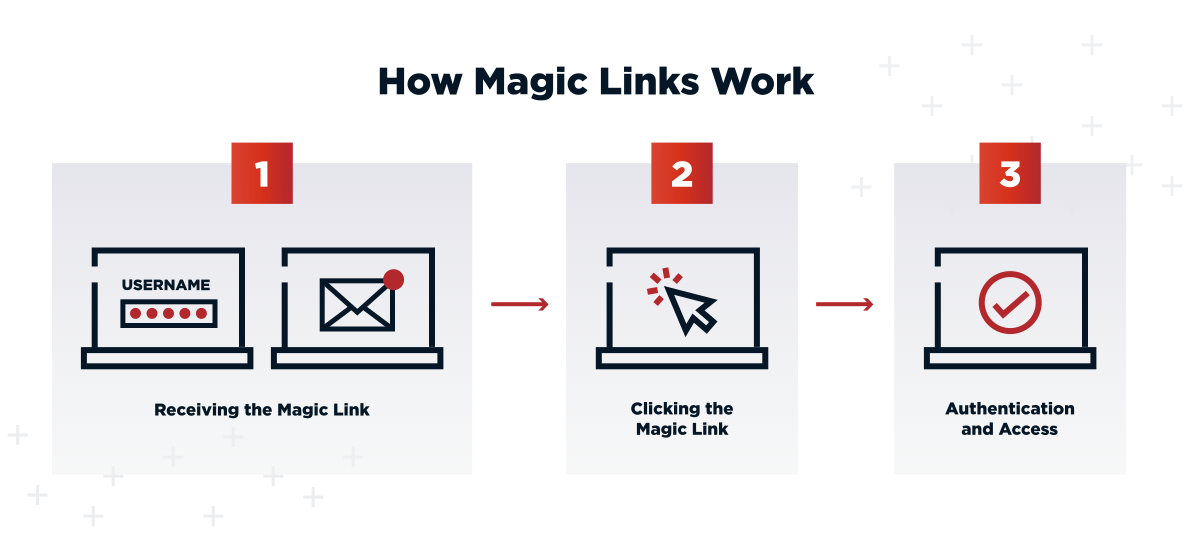
Magic links - also commonly referred to as email magic links - are growing in popularity as an effective passwordless authentication method. Organizations looking for more secure and streamlined authentication processes will appreciate the simple user experience, as well as the cost and productivity benefits associated with magic links. Keep reading to learn how magic links work, what their benefits are, and how to implement them at your organization.

Key Takeaways


  • Passwordless authentication via email: Magic links replace passwords by sending a one-time URL to the user’s email, enabling a simple flow (request → receive → click).

  • Well-suited for low-friction use cases: Ideal for CIAM scenarios such as temporary access, onboarding, and account recovery where ease of use is critical.

  • Security is context-dependent: Overall security relies on the protection of the user’s email account and should be augmented with additional authentication factors for high-risk or sensitive applications.
Limitations and Security Considerations

While effective, magic links are not a silver bullet and require specific security controls.


Email Dependency and Deliverability

Authentication relies entirely on the user's ability to access their email. Service outages, aggressive spam filters, or delays in email delivery can block user access. Organizations must ensure high email deliverability rates to maintain reliability.


Email Account Security Risks

If a user's email account is compromised via phishing, the attacker gains access to any service using magic links for that email. To mitigate this, enterprise environments should enforce MFA on the email account itself or require a second factor for the magic link login.


Account Recovery Challenges

If a user loses access to their email account, they lose access to the application. A robust fallback method, such as SMS verification or identity proofing via support, is necessary to handle these edge cases.


Lack of Industry Standards

Unlike FIDO2 or WebAuthn, there is no strict industry standard for magic link implementation. This leads to inconsistencies in token expiration times, one-time use enforcement, and pre-fetching prevention across different vendors.

Best Practices for Implementation

To ensure security and usability, follow these implementation guidelines.


Design Clear, Branded Email Communications

Emails should be instantly recognizable to prevent users from marking them as spam. Use consistent branding, clear "Log In" buttons, and anti-phishing markers to build trust.


Optimize for Mobile Devices

A significant portion of users will open magic links on mobile devices. Ensure the email template is responsive and the target landing page handles mobile deep-linking correctly to prevent broken flows.


Set Appropriate Expiration Windows

Balance security with convenience by setting token expiration times between 10 to 15 minutes. Additionally, ensure links are strictly single-use; once clicked, the token must be immediately invalidated.


Implement Fallback Authentication Methods

Always provide an alternative login path. If email delivery fails, allow users to request an OTP via SMS or contact support for identity verification.


Test Across Email Clients and Providers

Aggressive email scanners (like those in enterprise Outlook environments) can sometimes "click" links to check for malware, inadvertently invalidating the token before the user sees it. Test thoroughly to handle these scenarios, potentially by adding a confirmation screen after the click.

Frequently Asked Questions

Magic links send a clickable URL that automatically authenticates users, while OTPs require users to manually type a numeric code. Magic links offer simpler UX but depend entirely on email access.

Yes, they eliminate password-based risks like credential stuffing. However, their security depends on the user's email account. For high-security use cases, they should be combined with a second factor.

Recent guidance from MagicAuth notes that magic link authentication tokens typically expire within 10–15 minutes and recommends enforcing short-lived, single-use links that become invalid immediately after the first successful authentication.

While email is standard, the concept applies to any delivery channel. "Magic links" can be sent via SMS or secure messaging apps, though email remains the most common implementation.

Not necessarily. Magic links can streamline registration and login into one flow (Just-in-Time provisioning), creating an account automatically when a new user verifies their email.

Share this Article:
Related Resources

Start Today

See how Ping can help you deliver secure employee, partner, and customer experiences in a rapidly evolving digital world.