What Is Step-Up Authentication and When Should You Use It?

May 24, 2024
-minute read
Headshot of Maya Ogranovitch Scott Ping Identitys Solutions Architect
Senior Product & Solutions Marketing Manager

In today’s dynamic identity and access management landscape, organizations must implement robust authentication measures to keep their systems and applications secure and protected. However, there is a certain threshold where legitimate users can become deterred by a login experience that they find inconvenient or unnecessarily complex. In these cases, users may turn to one of your competitors that offers a more seamless experience.


To find the right balance between ease of use and system security, many organizations find that a context-based method like step-up authentication is an effective solution. To learn more about step-up authentication and when it’s most appropriate, continue reading below as we dive deeper into the possible use cases and industry applications

What Is Step-Up Authentication

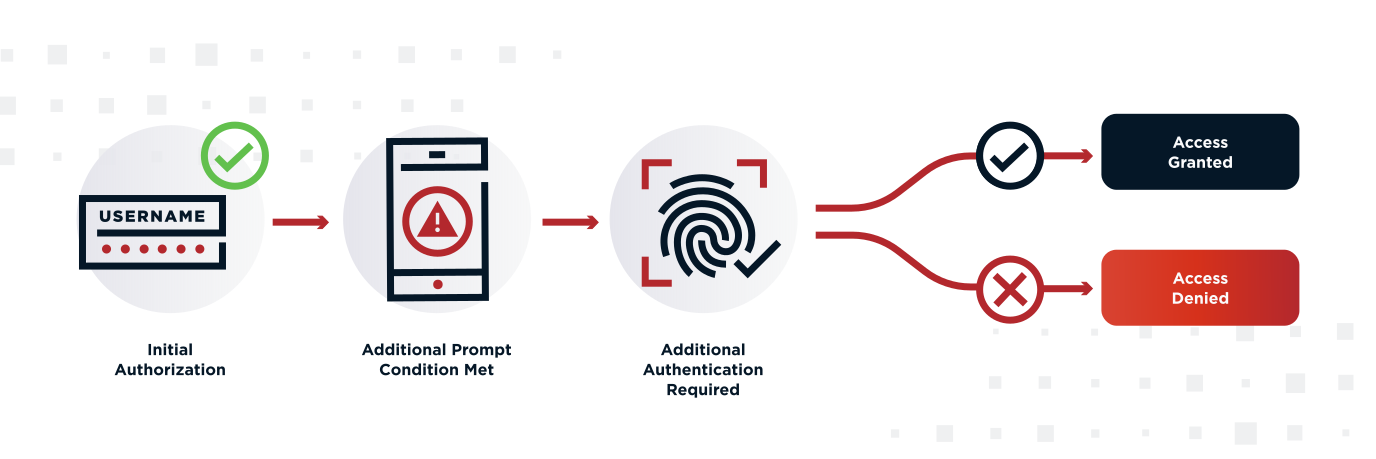
Step-up authentication is a security solution where users supply their primary login credentials to initially access a system, but are prompted with an additional authentication step when they’ve met specific conditions.


Each organization’s security needs and compliance requirements are unique, so such conditions will be customized for their specific systems, applications, and devices.


When defining these conditions, systems administrators will consider the risk level of exposure for certain assets or resources, setting the rules for additional security requests accordingly to protect the data and information they deem most sensitive.


Overall, the goal of step-up authentication is to eliminate some of the friction users face during login attempts, while still implementing the right level of security as needed to protect sensitive information.

A visualization of stepup authentication

Step-Up Authentication vs. Adaptive Authentication

Step-up authentication is often compared to adaptive authentication, or risk-based authentication (RBA); however, there are some critical distinctions between them that are worth mentioning.


The biggest difference between the two is how they handle authentication requirements in response to contextual risk factors. More specifically, you can think of step-up authentication as a static method, while adaptive authentication is dynamic.


In practice, this means that systems using step-up authentication rely on pre-defined conditions or trigger events that will present the user with an additional authentication challenge when necessary. On the other hand, adaptive authentication will adjust security requirements in real time based on the context and risk factors of a user’s behavior.


So, with adaptive authentication, even if a user has not necessarily met certain triggers or conditions required by step-up authentication, they could still be met with additional security challenges based on their perceived risk profile and the context of their access request.


For instance, if users attempt to log in from an unknown IP address, if their location at the time of an access attempt is unusual, or if they’re using an unrecognized device, this could be viewed as suspicious or abnormal behavior. As a result, an adaptive authentication system may prompt an additional authentication challenge in response to ensure they’re the authorized user of the account. Meanwhile, step-up authentication might be triggered when a user attempts to access a specific system or resource that is considered high risk.

When to Use Step-Up Authentication Over Adaptive Authentication?

While the two methods operate on similar principles, there are certain situations where organizations want the predictable access control that step-up authentication provides over adaptive authentication.


Step-up authentication allows administrators to define specific thresholds or conditions where users are prompted with additional authentication requests, while adaptive authentication will only do so based on their assessment of the user’s risk profile at a given moment. So, if you want to guarantee that users are always required to provide an additional authentication factor when they attempt to access certain data or critical operations, step-up authentication is the best tool for the job.


In addition, step-up authentication tends to be easier to implement, as it is not reliant on real-time, continuous risk scoring but rather a static set of rules and policies. That said, organizations may find it useful to add adaptive authentication as an additional layer of security used in conjunction with step-up authentication, as these two methods evaluate different factors.

Step-Up Authentication vs. Multi-Factor Authentication (MFA)

Step-up authentication and multi-factor authentication (MFA) are not necessarily two separate concepts. In fact, step-up and adaptive authentication both fall under the umbrella of MFA.


As a reminder, multi-factor authentication is a security approach where users must present two or more authentication factors to verify their identity. This might be a password and a facial scan or a password and a one-time code sent to the user’s device via push notification when they’re initially trying to access a system, device, or other sensitive resources.


Within this context, we can see how step-up authentication works as a specific application of MFA, requiring additional authentication from users when certain actions or conditions are triggered, just not during initial authentication. In other words, step-up authentication simply codifies a set of circumstances under which a system might call for MFA, and using step-up authentication allows organizations to limit MFA fatigue by asking for additional authentication only when it is truly needed, instead of at every interaction.

When Do You Need Step-Up Authentication?

You may determine that access to certain parts of your system or application is low-risk enough that you don’t need to implement strict access management requirements for users during the initial login process. In these cases, a simple username and password combination will make it easy for many users to gain access to these resources.


However, there may be areas of your system that only a limited number of users need to access. This is where step-up authentication is highly useful, protecting critical assets or high-risk resources with an additional layer of security.


For example, your company may have an internal operating system that all employees need to access for basic information and functions that are necessary for their roles. This might include general company announcements, non-sensitive documents, and other pieces of information. Employees can use their standard credentials to quickly access the system without having to go through multiple authentication steps.


But, the system may also contain more sensitive information like financial reports or customer data, which only a few key employees need to access. So, when an employee attempts to access these resources, step-up authentication can prompt them with an extra security request, ensuring only authorized users gain access.

Examples of Step-Up Authentication

There is a wide variety of use cases and industries where step-up authentication can be an effective security system.


Again, organizations looking for the right balance between security and a seamless user experience see step-up authentication as a favorable authentication process. It allows them to significantly reduce friction in certain cases, while still ensuring sensitive information and data remain protected. Below, we’ll discuss some of the higher-risk industries and specific scenarios where step-up authentication can be implemented.


Step-Up Authentication in Financial Services

In the banking industry, step-up authentication can be highly useful to ensure users can easily access basic information related to their accounts, though more critical functions are protected with additional authentication steps.


So, let’s say a customer can log into their bank’s mobile app with a simple username and password, which gives them access to low-risk information like their account balances or allows them to complete basic actions like depositing a check.


But, if they want to engage in more high-risk activities, like making a transfer between their accounts, this might trigger an extra security step. The user may be required to enter a one-time password sent to their mobile number via SMS or supply a biometric authentication sample to confirm their identity before they can continue.


Step-Up Authentication in Ecommerce and Retail

Step-up authentication is applied similarly in an ecommerce or retail industry context. If a shopper visits a retail site and wants to log into the frequent shopper or loyalty program they’re enrolled in, they may be able to enter their username and password to view non-critical information like what’s in their wishlist or their purchase history.


But, if users want to make a large transaction or change their account information–like updating their payment method or changing their shipping address–these actions can trigger an additional authentication step to ensure they are the rightful account owner and prevent fraud attempts.


Step-Up Authentication in Healthcare

There are also compelling use cases for step-up authentication in the healthcare industry, especially to help organizations comply with HIPAA regulations. For instance, if a patient enters their username and password to access their online portal, they may be able to view their most recent prescription refill or upcoming appointments.


However, let’s say the patient wants to access sensitive data, like viewing their electronic health records or requesting a new prescription refill. In these scenarios, they may need to complete an extra authentication step to prove they are who they claim to be and prevent unauthorized access to their information.

Implementing Step-Up Authentication – Key Considerations

Before implementing step-up authentication, there are a few key factors organizations need to consider. To start, assess your risk tolerance to determine which assets and actions are the most vulnerable and require additional security. Based on this assessment, you can define the conditions and events that will trigger step-up authentication, like if the user wants access to a certain database, make a high-risk transaction, or engage in any other activity you’ve deemed sensitive.


Also take into account the specific regulatory requirements you must adhere to for compliance with HIPAA, GDPR, and other standards. This may further dictate the actions and conditions where you implement step-up authentication.


Understand how step-up authentication can impact the user experience. It’s best to design a step-up authentication system that balances security with user convenience. Ideally, you can create a low-friction environment for most users while ensuring your most sensitive information or operations are safeguarded through step-up authentication.


The implementation of step-up authentication will vary from case to case depending on the unique needs and requirements of each organization. However, you should prioritize using a compatible system that can fit seamlessly into your existing authentication workflow, ensuring minimal disruption to users while enhancing system security.

Step-Up Authentication With Ping Identity

Step-up authentication, along with adaptive authentication, allows organizations to apply different levels of authentication depending on the perceived risk of certain activities and access requests. As a result, these systems can make it easy for more users to gain access to general, low-risk resources, while ensuring critical assets or operations are safeguarded with an additional layer of authentication.


This security method has a range of use cases across different industries and applications, including in healthcare, financial services, retail, and ecommerce. However, organizations need to consider their specific risk tolerance, compliance requirements, and user experience objectives before implementing step-up authentication.

Top 5 MFA Considerations


Review this checklist for additional guidance on how to evaluate multi-factor authentication solutions and find the best option for your organization.


Share this Article:
Related Resources

Start Today

See how Ping can help you deliver secure employee, partner, and customer experiences in a rapidly evolving digital world.