Top Benefits of SSO and Why It's Important for
Your Business

Sep 16, 2024
-minute read
Director, Product & Solution Marketing

While single sign-on (SSO) has been widely adopted by organizations for years, its significance is often overlooked. As enterprises increasingly move to the cloud and rely on third-party services, ensuring business efficiency and delivering a seamless customer experience becomes crucial. To achieve this, users must have secure access to multiple applications from any location and device.


Single sign-on allows users to log in to different apps and resources using a single set of credentials. This makes it much easier for the user and more secure for the business.


Single sign-on is a technology that offers many benefits. Read on to understand how it works and the advantages it provides.


What is SSO?

Single sign-on (SSO) authentication allows users to securely access multiple related applications or systems using just one set of credentials.


SSO functions based on a trust relationship established between the party that holds the identity information and can authenticate the user, called the identity provider (IdP), and the service or application the user wants to access, called the service provider (SP). Rather than sending sensitive data back and forth across the internet, the IdP passes an assertion (often via an identity standard such as Security Assertion Markup Language (SAML) or OpenID Connect (OIDC) to authenticate the user for the SP. With SAML, the relationship between an IdP and the SPs is called a circle of trust, which allows them to grant users access to the SP, trusting the identity information provided by the IdP is accurate and secure.


OpenID Connect (OIDC) is a standard built on the OAuth 2.0 framework and is often used for SSO solutions, offering a more modern alternative to SAML.


Cloud applications are taking the business world by storm.
Whether you're an enterprise with employees accessing critical applications, Or a business offering Web and Mobile software and services to the marketplace, The cloud is changing the way IT infrastructure is accessed and utilized.
Today, as employees, partners, and customers increasingly rely on cloud applications to Conduct business, they inevitably accumulate numerous and often weak passwords to access There are dozens of cloud applications.
The proliferation of these non-standardized cloud identities, Many of which are forgotten, lost, and easy to steal, adds significant corporate risk and management expense, while also frustrating users.
To help secure Cloud identities, many of today's cloud-based applications increasingly Use a standard known as Security Assertion Markup Language, or SAML.
SAML is a secure XML-based communication Mechanism that shares identities between multiple organizations and applications.
But SAML's power in the cloud is its ability to eliminate most passwords and enable single sign-on Single sign-on.
Single sign-on with SAML gives faster, Easier, and trusted access to cloud applications without storing passwords or Requiring users to log into each application Individually.
Instead of passwords, applications that use SAML accept secure tokens.
Which only reveal what is needed for access to the application.
Since no passwords exist, there is nothing for customers, partners, or employees to forget, lose, or have stolen.
For SAML to work, there are three entities involved.
First is the Identity-Provider-IDP.
An Identity-Provider-IDP maintains a directory of users and an authentication Second is the Service-Provider-SP.
Service Providers run the target website, application, or service.
Identity and Service Providers may be separate organizations, such as when an employee accesses an external cloud application like Salesforce.com, or when consumers access Comcast for online content from programmers like HBO or ESPN.
The third entity is the user who has a known account with the Identity Provider.
SAML simplifies the relationship between these entities and strengthens the security of their Interactions.
A user signs into their company network with Corporate credentials.
When they click a link to access applications or secured content at the Service-Provider-SP's application, the Identity-Provider-IDP generates a SAML token to be sent to the Service-Provider.
The token grants access to APPs and content, but it does not pass any info that could be used by anyone else to access them.
The user is free to navigate securely across the applications they need.
A properly architected and deployed SAML 2.0 solution increases security by eliminating Multiple weak passwords for each cloud application while streamlining the secure Access process.
It delivers substantial business value by Reducing costs and boosting employee productivity.
And it enhances customer satisfaction, all by providing one-click access to Cloud Applications.
Although SAML is one of the fundamental cloud Identity security standards, there are other standards needed to fully construct a secure Cloud identity solution.
To learn more about SAML 2.0 and other security standards, visit the Resource Center at PingOne identity.com.

How Does SSO Work?

SSO leverages centralized authentication, meaning all enterprise and third-party apps are accessed through a single authentication service that confirms a user’s identity using one set of credentials. If the user is not already authenticated, here’s how the sign-on process works:


  • Step 1: The user navigates to the website or application they want to access (the SP).
  • Step 2: The SP sends a request and redirects the user to the SSO system (the IdP).
  • Step 3: The user is prompted to authenticate by providing credentials required by the IdP, such as a username and password, a passkey, or a form of multi-factor authentication (MFA) like a fingerprint or facial recognition.
  • Step 4: Once the IdP validates the user's credentials, in SAML-based SSO systems, an assertion is sent back to the SP to confirm successful authentication.
    • In OIDC-based SSO systems, an identity token and an access token are returned to the user’s browser.
    • This identity token allows the user to access other applications within the SSO environment without needing to re-enter their credentials.
  • Step 5: The user is then granted access to the desired application.

Once this process is complete, the user authentication is performed, and other SPs accessed by the user will confirm their authentication with the IdP.


Key Point: These SPs will not require credentials to be presented again, removing friction from the sign-in process and creating a smoother experience for the user, who can now access various sites and applications without having to re-enter their credentials.


Keep in mind that when OIDC is used in SSO solutions, the equivalent of an SP is called a relying party (RP) and the IdP equivalent is referred to as an OIDC provider (OP).


Stop Identity Fraud with an Identity Threat Prevention Taxonomy

What are the Benefits of SSO?

  1. Increased Productivity
  2. Improved Security
  3. Strengthened with MFA
  4. Enhanced with Risk-Based Authentication (RBA)
  5. Decreased IT Costs
  6. Improved Job Satisfaction for Employees
  7. Enhanced Customer Experience
  8. Increased Adoption Rates
  9. Tighter B2B Collaboration
  10. Regulatory Compliance


1. Increased Productivity

SSO increases employee productivity by reducing the time they must spend signing on and dealing with passwords.


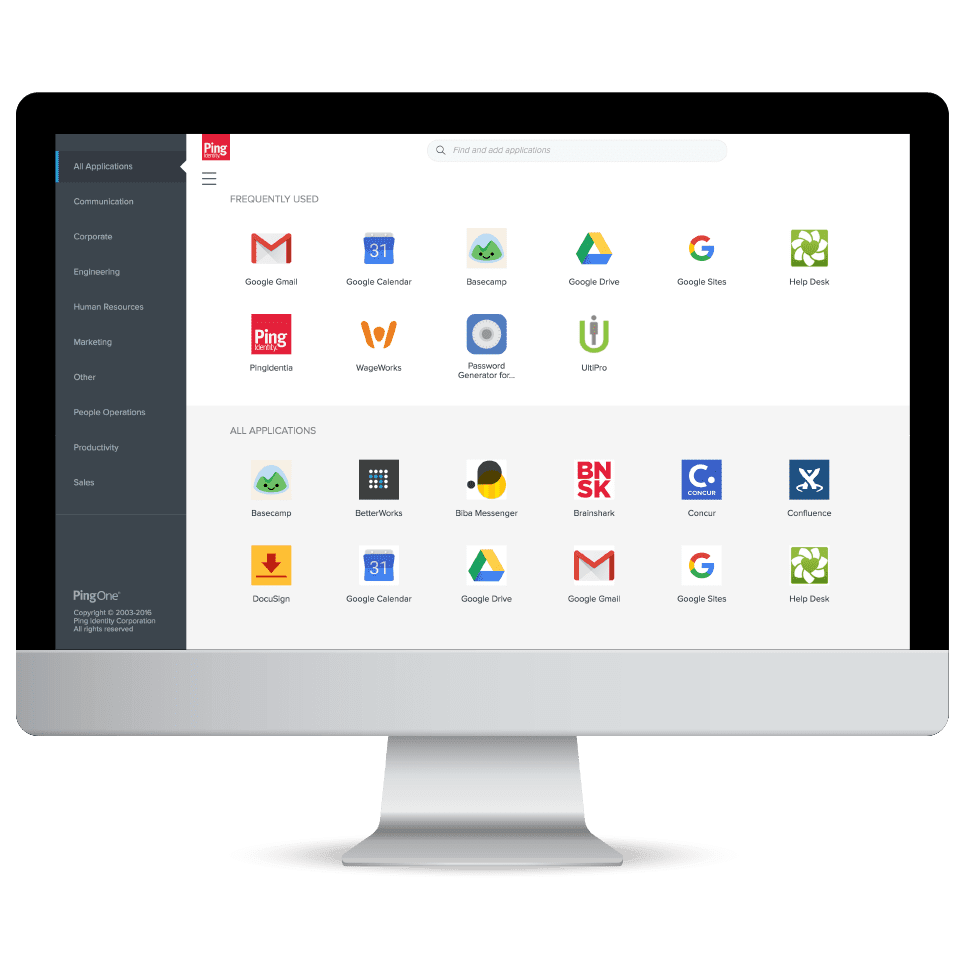
In a workforce context, employees only need one password to access all of their apps, which can save them time logging in, thus increasing productivity. SSO solutions often give them access to a dock where all their apps are available, further enhancing the employee experience and allowing them to focus on their job tasks more quickly and efficiently.


Image of a desktop computer displaying the PingOne desktop Icons displayed are available through single signon

2. Improved Security

A common myth about SSO solutions is that they compromise security. This misconception is based on the idea that should a master password be stolen, all related accounts will be exposed. However, the reality is that with good practices, SSO significantly decreases the likelihood of a password-related hack. With SSO, users only need to remember a single password for all their applications and are more likely to have secure passphrases. They are also less likely to reuse passwords or write them down, which reduces the risk of theft. A further benefit is that authentication policies can be centralized across the application landscape, making management and enforcement of things like password complexity and MFA methods more streamlined.


3. Strengthened with MFA

To provide an additional layer of security, SSO can be combined with MFA capabilities, which require users to provide two or more pieces of evidence to prove their identity when signing on. For example, a password and one-time password (OTP), generated on or securely delivered to one of their mobile devices. Modern MFA also includes passwordless technologies, such as FIDO2 passkeys, which help combat vulnerabilities created by passwords, like phishing attacks.


4. Enhanced with RBA

RBA, or risk-based authentication, is another strong security feature security teams can utilize to bolster their SSO process. RBA permits the use of tools to observe user activity and context to identify any strange behavior caused by an unauthorized user or cyberattack. For example, multiple login failures or incorrect IPs could trigger the system to require MFA or block the user completely depending on the circumstances.


5. Decreased IT Costs

Gartner estimates that 40% of all help desk calls are due to password issues. Another study by Forrester reveals password resets1 cost organizations upward of $70 per fix. SSO drives down help desk costs by reducing the number of required passwords to just one.


Some organizations have implemented specific password complexity requirements, like length and the use of special characters. However, these requirements may make passwords more difficult to remember. This can lead to more users constantly having to reset their passwords, fueling password fatigue and login frustration. These challenges are not only aggravating for users, but they also place added strain and costs on IT teams.


With strong identity verification capabilities, including document verification and liveness checks, a password reset option, and other account recovery use cases, can be self-serviced. This further improves the user experience, while also driving down operational costs and improving security.


6. Improved Job Satisfaction for Employees

Employees are using an increasing number of applications in the workplace, with each often requiring unique login credentials. This places a lot of burden on workers and can be time consuming and frustrating. It was found that an average of 68% of employees have to switch between ten apps every hour.


SSO enhances job satisfaction by allowing employees to work without interruption and quickly access everything they need. Easy access is particularly valuable for employees that are in the field or working from multiple devices.


7. Enhanced User Experience

SSO solutions are not only for workforces, but they’re also for customer use cases. Findings from our 2024 Consumer Survey reveal 54% of global consumers have abandoned an account or online service due to login frustrations, and 75% wish they could change how they log in to apps and websites they frequently use.


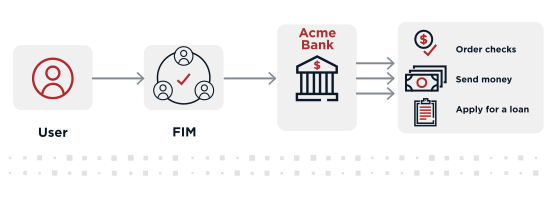
Retailers, healthcare providers, banks, and other B2C organizations can eliminate these issues and give customers access to everything they need with SSO. Users will enjoy a more seamless experience with less friction and less frustration. The immediate benefits of improved user experiences include customer loyalty, higher conversion rates, and enhanced brand visibility.


A diagram depicts a flow from the user to FIM to Acme Bank and then to capabilities including order checks send money and apply for loan

8. Increased Adoption and Engagement Rates

The competitive nature of today's market means customers have plenty of alternatives. If they experience too much friction or confusion when interacting with your brand or trying to purchase your products, they will seek out another option, and fast. SSO increases the chance users will choose you more frequently.


9. Tighter B2B Collaboration

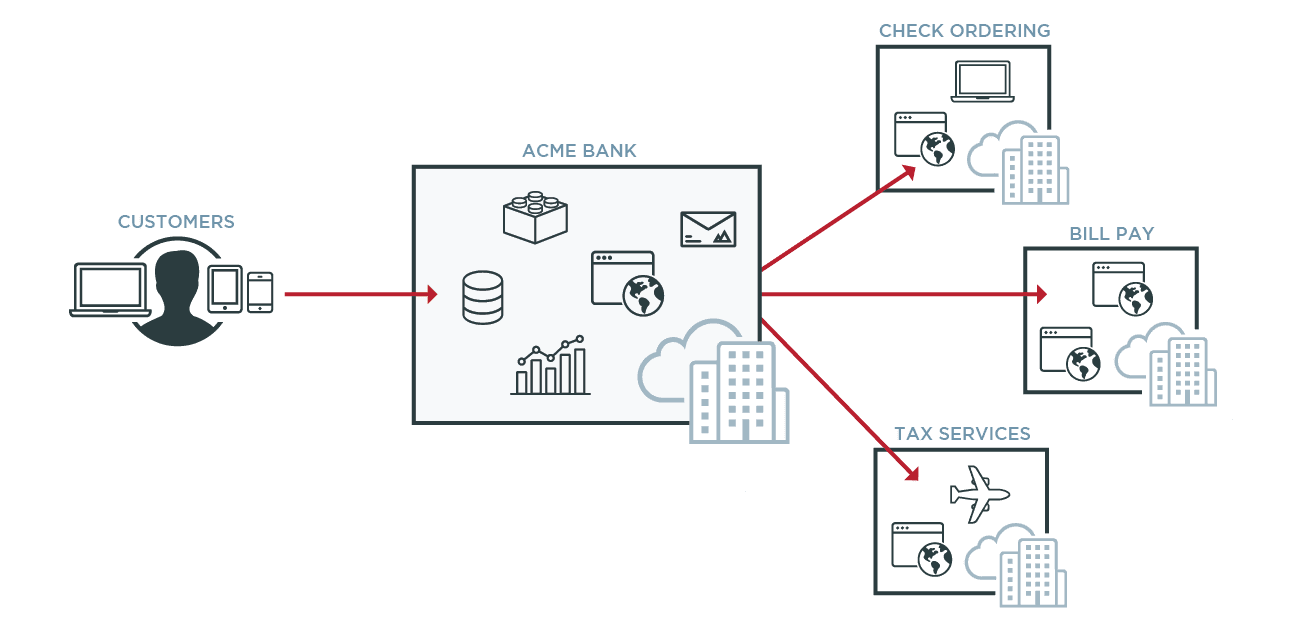
SSO plays a critical role in the success of B2B partnerships as well. Everything from cars and phones to essential home items are built and distributed through collaborative efforts between multiple enterprises. This type of business collaboration requires giving employees from other companies access to specific data, digital tools and applications. Federated SSO (or federated identity management) can help create more efficient and effective collaboration between businesses by bridging identity systems.


Businesses also often collaborate to provide related services to joint customers. Federated identity management simplifies access to services from multiple companies, enabling customers seamless access across company boundaries.


10. Regulatory Compliance

Industry regulations like Sarbanes-Oxley and HIPAA require companies to implement security measures to protect data. SSO is often implemented as part of a broader identity and access management (IAM) solution. This combination can help you comply with regulations requiring strong authentication and access control. IAM can also help businesses comply with other regulatory requirements pertaining to privacy, activity tracking, and single logout.


Diagram showing how CIAM solutions can improve customer experience using Single signon SSO

Why is SSO Important?

With each passing day, the tech world presents us with more systems and applications to use in our everyday lives. Memorizing complex passwords for each of these apps is a challenge and can become a security risk. SSO gives your customers and employees the ability to access different applications and services easily, quickly and more securely.


Chances are you’ve accessed a website or an app via SSO in the last few days. Now you understand how the technology works and why it’s critical for your business. 


If you’re ready to start evaluating SSO providers to uplevel your business, check out our "Enterprise Workforce SSO Buyer’s Guide" and "Security Leader’s Guide to SSO" to understand the most important requirements and considerations.

An excellent example of SSO can be found within Google's suite of applications. Once a user signs on to Gmail, they gain access to other Google services, including YouTube, Google Drive, and Google Photos.

Usernames and passwords are the most targeted pieces of information by cybercriminals. Everytime a user creates a new password, they are opening up another opportunity for hackers to compromise the system. Reducing logins to one set of credentials definitely improves your organizational security. Ideally, with SSO, users only log in once each day and use one set of credentials, substantially reducing the number of attack vectors.

A SAML SSO flow involves the exchange of assertions between an IdP and SP. These assertions can be encrypted and signed for added security. Additionally, the identity provider typically checks a user’s credentials against the encrypted identity data stored in a highly secure directory.


In an OIDC/OAuth 2.0 framework, SSO allows users to authenticate just once with an IdP to gain access to applications, and OAuth 2.0 handles the authorization by issuing tokens, while OIDC provides authentication and user information. After the user authenticates with the IdP, the applications receive tokens to verify the user’s identity and grant access securely.

Even though SSO features robust protection, it’s still important to strengthen your system by identifying and filling security gaps. You can boost the protection capabilities of your SSO system by:


  • Implementing and enforcing stringent password policies
  • Leveraging the latest standard authentication protocols, such as FIDO2 passkeys
  • Implementing MFA
  • Defining roles and limiting access to authorized users

Many business applications, including Zoom, support SSO via standard protocols such as SAML and OIDC. You can integrate these applications with your SSO solution to provide convenient and secure access to your users. At the same time, you get central management and auditing, which can support compliance objectives. Your users become more productive since they can use their company credentials to get access to the applications they need to do their job, usually through an enterprise application dock.

5 Best Practices for Mitigating Security Risks
with SSO

1. Implement MFA

Adding MFA provides an extra layer of protection, ensuring that even if user credentials are compromised, unauthorized access is less likely.Require MFA during initial sign-ins or when accessing sensitive applications, using methods like OTP or biometrics (fingerprint, facial recognition).


2. Enforce Strong Password Policies

Since SSO centralizes access, a single compromised password can jeopardize multiple accounts. Ensure password complexity, length, and expiration policies are strictly enforced. Use passwordless authentication methods like passkeys to further reduce risks associated with passwords


3. Monitor and Analyze User Behavior

Continuous monitoring for unusual login patterns can help identify security threats, such as stolen credentials or unauthorized access attempts. Use RBA and behavioral analytics to flag abnormal activity, such as logins from unusual locations or devices, and prompt additional security checks.


4. Regularly Review Access Permissions

Users often accumulate unnecessary permissions over time, increasing the risk of unauthorized access to sensitive data. Conduct regular audits of user roles and access rights, ensuring that users have the minimum required access to applications (principle of least privilege).


5. Encrypt SSO Communications and Tokens

Securing the exchange of authentication tokens between Idps and SPs prevents interception and misuse by attackers. Use encryption and digital signatures for SSO assertions and tokens (e.g., SAML assertions or OIDC tokens) to ensure data integrity and confidentiality during transmission.


By implementing these practices, organizations can significantly reduce the security risks associated with SSO, while maintaining a seamless user experience.

Share this Article:
Related Resources

Start Today

See how Ping can help you deliver secure employee, partner, and customer experiences in a rapidly evolving digital world.