Why Passwords Are Insecure and What You Can Do about It

Sep 28, 2022
-minute read

Introduction

Digital transformation in all aspects of life and work means that more resources are becoming accessible online. The online availability of public and enterprise services provides numerous benefits to organizations and consumers. However, it also means these resources are subject to innumerable cybersecurity threats.


Password authentication systems have been the most prevalent means of protecting private information online, having been used for years to secure online digital assets. However, it’s become quite clear that passwords are insecure, and this method is no longer effective.


According to the Verizon 2020 Data Breach Investigations Report, 80% of breaches involve brute force attacks or the use of lost or stolen credentials. Passwords—especially those used to secure access to privileged work accounts and network resources—are threat actors’ most sought-after target.


The increase in data breaches and problems with password-only authentication systems have encouraged the IT industry to think about strengthening this authentication method or removing it entirely.


This article will discuss the disadvantages of password-only authentication systems, common attack techniques used to compromise passwords, and the most secure alternative solutions to replace password systems.

Why Passwords Are Insecure

There are several reasons why authentication using a username and password is insecure. The turn towards passwordless forms of authentication speaks to the vulnerability and permeability of password-based authentication. Often, exploits related to passwords stem from users’ poor password practices—though this isn’t always the case.


Let’s explore exactly why passwords are insecure.


Using the Same Username

Usernames are often common or shared publicly, meaning they have little security value. For example, someone’s social media handle could be the same username they use across different platforms and services. 


Using Repeated Passwords

People tend to use the same password to protect many online accounts. Some users even use the same password to secure their personal and work accounts. If a hacker successfully compromises a frequently used password, they can gain broad access to all the resources the password protects.


Keeping the Default Password

Many people don’t change the default password when installing new devices, such as home routers and other Internet of things (IoT) devices. Maintaining these default passwords makes it easy for hackers to gain unauthorized access quickly.


Sharing Passwords

Employees tend to share their passwords to access common services in work environments. For example, you may share your access to a specific cloud application with other individuals in your organization. While this may seem like an easy method of ensuring everyone can access the resources they need, sharing passwords makes it impossible for IT to know who’s accessing and potentially making changes to the application. As a result, there’s no concrete way to determine whether the person accessing the application should be accessing it.


Using Easy-to-remember Passwords

People prefer memorable passwords, but this makes passwords easy for hackers to guess or crack using specialized password attack tools. Nordpass published a report containing the top 200 most common passwords according to 2021 research, citing millions of individuals using the same easy-to-remember password. 


Using Insecure Protocols, Networks, and Databases

When accessing an online service that requires authentication, you must provide your username and password. But suppose the online service uses an insecure protocol to exchange information between the user and the web server. In that case, hackers can intercept the unencrypted connection and steal a password transmitted in clear sight.


Additionally, when you access online services, the website you sign into stores your password in a centralized database, known as a credential database. A typical security measure to prevent unauthorized access to a credential database is to use hashing to store the user passwords encrypted in the credential database. Unfortunately, some websites still store users’ passwords in a credential database in unencrypted formats like plain text. If a hacker successfully gains unauthorized access to the server housing the database, they’ll also gain access to all users’ accounts.


Most Common Attack Techniques for Compromising Passwords

Threat actors use different attack techniques to steal users’ passwords, especially those created following the insecure password practices listed above. Let’s discuss some of the most common methods and strategies attackers use to compromise passwords.


Password Cracking Tools

Attackers use password cracking tools with various strategies and algorithms to obtain passwords. There are three main kinds of password cracking attacks:


  • Dictionary attack — With this method, attackers use standard dictionaries to guess the target password. This attack works by attempting lists of common words and phrases from different dictionaries.


  • Brute-force guessing attack — Brute force attacks involve trying every possible combination of user passwords or passphrases until finding the correct one.


  • Hybrid attack — This method combines dictionary and brute-force attack techniques to find the correct password/passphrase.


Phishing Attacks

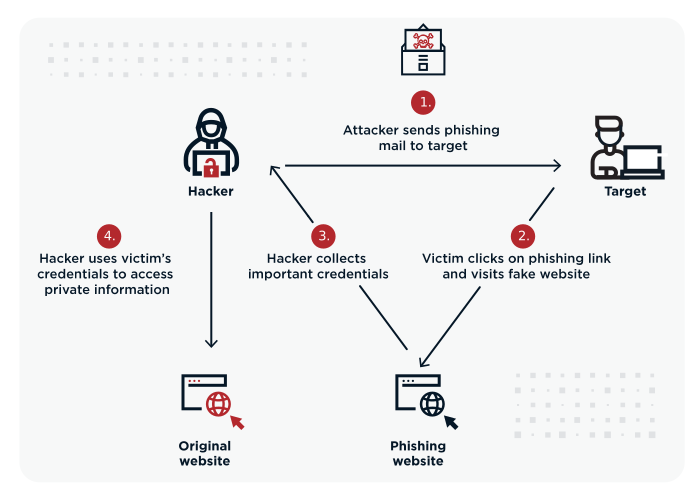
Phishing is the most well-known type of social engineering attack. In this type of attack, the malicious actor pretends to be a trusted entity—such as a popular online merchant, email service provider, or bank—and usually asks a recipient to click on a link within an email to update their account information or reset their password.

The main aim of phishing emails is to steal target account credentials by using different social engineering tactics to convince you to reveal your password or install malware on your device(s).


Phishing emails are considered the starting point of more devastating attacks. For instance, Advanced Persistent Threats (APT) and ransomware operators initiate their attacks with a phishing email to gain a foothold in their target IT environment.


Man-in-the-Middle Attacks

In man-in-the-middle attacks, the hacker stands between you (the victim) and the application or system you’re trying to access. The attacker attempts to intercept the conversation to steal your password. This can occur when you’re communicating directly with an application or system, when one application tries to communicate with another, or when you’re communicating with another authenticated user over an unsecured network.


Credential Stuffing

In credential stuffing, the attacker tries to collect breached account information from various online sources, hoping that some users use the same username and password combinations to secure other online accounts. For example, attackers surf the darknet and Torrent websites and download a list of user credentials that were compromised in previous data breaches. They then use those credentials on other online services or resources to see if the same username and password combination can be used to grant them unauthorized access.


Malware

The term malware describes software that intends to exploit hardware or other software. It includes viruses, Trojans, spyware, and other kinds of code or software with malicious intent.


Malware like spyware and keyloggers is generally used to capture user credentials without the user’s participation. However, malware can also be introduced into the target system using different, more deceiving ways, such as by:


  • Sending phishing emails

  • Installing Internet programs

  • Using pirated software

  • Attaching strange USB sticks to the system

  • Opening malicious MS Office files (malicious macros) and PDF documents


Malware frequently infects machines by tricking users into installing a program or clicking a link that’s (sometimes unknowingly) installed via the Internet. 

Protecting Against Passwords Attacks

There are different measures individuals and organizations can take to strengthen the security of their password-only authentication systems. They can also remove passwords entirely from the process.


  • Use biometric authentication that uses human biological and physical characteristics to authenticate users, such as facial and voice recognition and fingerprint scans. There are several best practices you should follow to ensure biometrics are secure.


  • Use single sign-on. With single sign-on, the user uses one password to authenticate into multiple online services and applications. When a user authenticates by signing on to a site or database linked to a centralized authentication server, they can then use that first authentication to verify their identity across other sites and resources. As a common example, many websites allow users to authenticate using their Facebook or Google credentials.


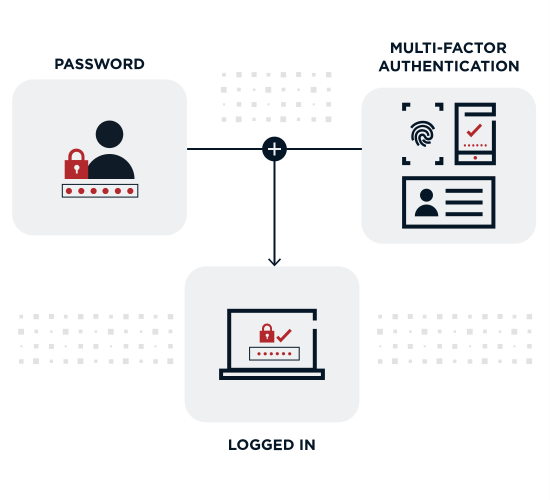
  • Implement passwordless authentication. This means that users can authenticate themselves without having to provide a password or any other knowledge-based answer. The goal of going passwordless is to authenticate users without taking on the risks that come with passwords. Instead, users are identified by other attributes. Biometric authentication and device identifiers are both popular forms of passwordless authentication. Biometric authentication leverages a “something you are” factor, such as your voice, fingerprint, or face, while device identifiers leverage a “something you have” factor, such as your phone. Using these authentication factors allows higher security than using only “something you know” factors, such as passwords.

Ping Identity Can Help You Go Passwordless

In this article, we’ve highlighted the various risks of using traditional passwords, how users can make their passwords vulnerable through poor security practices, and common techniques used for password attacks. 


Passwords are the most used authentication method and will likely remain so well into the future. However, using password-only authentication to secure online accounts is a security risk. 


Fortunately, proper security measures can mitigate the dangers of using passwords as your user authentication method. To increase your system’s security while using passwords, be sure to implement single sign-on and MFA to decrease the chances of your passwords being exploited. Learn more about Ping Identity’s passwordless authentication capabilities.

Share this Article:
Related Resources

Start Today

See how Ping can help you deliver secure employee, partner, and customer experiences in a rapidly evolving digital world.