What Is a Brute Force Attack? Types & Prevention Guide

Jun 4, 2024
-minute read
Last Updated: Mar 2, 2026
Headshot of Maya Ogranovitch Scott Ping Identitys Solutions Architect
Senior Product & Solutions Marketing Manager

Key Takeaways


  • Definition: Automated guessing targets passwords, keys, and hidden pages, turning weak credentials into fast unauthorized access for criminals online today.

  • Methods: Dictionary, hybrid, stuffing, reverse, spraying, and rainbow tables reduce effort, especially when users recycle passwords across sites too often.

  • Impact: Successful compromises enable identity theft, lateral movement, and malware delivery, usually preceding larger breaches and fraud schemes for victims.

  • Defense: Use strong passwords, multi-factor checks, rate limits, and bot detection, then adopt passwordless options for maximum resilience at scale.

A brute force attack is a trial-and-error tactic used by hackers to crack login credentials, encryption keys, and hidden URLs. Despite being an older technique, it remains highly effective because many users still rely on weak passwords. A surprising number of people use the same password for everything, and simple strings like "111111" remain dangerously common. Understanding this threat is a key part of any identity and access management (IAM) strategy.

What Is a Brute Force Attack?

In simple terms, a brute force attack is a method where attackers use automated software to guess password combinations until they find the correct one. Think of it like a thief trying a huge ring of keys to open a locked door through persistence rather than finesse.


Unlike exploits that target software vulnerabilities, these attempts target the authentication step itself. Attackers may aim at passwords, encryption keys, or hidden web pages. While the concept is straightforward, the scale can be enormous because botnets can test vast numbers of combinations across many accounts.

How Brute Force Attacks Work

These attacks follow a predictable pattern, but the speed and sophistication behind them have grown significantly. Here's what the typical process looks like and why modern computing power makes it such a serious concern.


The Attack Process

The process typically begins with an attacker selecting a target, such as a login page or an encrypted file. They then configure a script or tool to systematically input character combinations. Often, the sequence starts with common passwords and then expands into broader patterns that include letters, numbers, and symbols.


Speed and Computing Power

Modern computing power has accelerated this threat significantly. With high-performance GPUs and distributed computing, attackers can test billions of combinations per second. That speed advantage forces defenders to rely on layered controls, not just password length or character variety.

Why Brute Force Attacks Are Dangerous

It can be difficult to appreciate the consequences of a brute force attack until you see what criminals do after they succeed. Often, the initial compromise is only the first step in a larger breach or fraud operation.


Data Breaches & Identity Theft

Once cybercriminals break into an online account, they gain access to sensitive information that can enable identity theft. With compromised identities, fraudsters can perpetrate advanced crimes such as account takeover (ATO) and new account fraud (NAF). In ATO scenarios, fraudsters use stolen credentials to access banking apps, email, or social media profiles and then change account details or make unauthorized transactions. With NAF, they use stolen data to open new lines of credit, loans, or services in the victim's name.


Lateral Movement & Persistent Access

After gaining a foothold, attackers may monitor user activity to gather intelligence for more serious crimes. For example, a fraudster might compromise a financial executive's email account, observe correspondence, and wait for a major transaction. At the right moment, the bad actor can send a fraudulent wire transfer link from the compromised inbox. Persistence can also enable privilege escalation and lateral movement to reach higher-value systems.


Malware Distribution & System Compromise

Successful compromises often set the stage for malware deployment. Criminals may redirect website traffic to malicious sites designed to steal sensitive information, or they may infect a site with hidden spyware. Fictitious sites can be crafted to resemble legitimate pages, tricking users into entering data such as credit card numbers. Spyware can quietly capture browsing habits and keystrokes, which may then be sold or used to deepen the compromise.

Types of Brute Force Attacks

There are multiple types of brute force attacks, ranging from manual guessing to sophisticated automated campaigns. Each approach exploits a different weakness, so understanding the variations helps you build more effective defenses.


Simple Brute Force Attacks

Attackers attempt to guess a user's password systematically without using advanced intelligence. This approach works best against weak passwords that are easy to guess, such as "password" or "123456." It is typically the most time-consuming approach because it can require many attempts.


Dictionary Attacks

This is a more efficient approach where the attacker uses a predefined list of common words, phrases, and passwords. Instead of trying random characters, the tool runs through a dictionary of likely options. This method exploits the human tendency to choose predictable passwords based on common words.


Hybrid Brute Force Attacks

This strategy combines dictionary attacks with systematic variations. Attackers use common words paired with logical substitutions, such as adding numbers or symbols. Examples include combinations like "Summer2026!" or "Bailey2026". This balances speed with coverage.


Reverse Brute Force Attacks

In this scenario, the attacker starts with a known password, often sourced from a breach, and tests it against many usernames. This technique exploits the fact that many users share common passwords and can be effective at scale.


Credential Stuffing

Also known as credential recycling, this method uses username and password pairs stolen from one breach to attempt logins on other sites. It relies on password reuse across services, which is unfortunate because the majority of users admit to reusing passwords. If a user recycles credentials, a breach at one site can expose many other accounts.


Rainbow Table Attacks

Attackers use precomputed tables of password hashes, known as rainbow tables, to reverse-engineer passwords. Instead of guessing the password directly, they compare the stored hash against their table to find a match. This method trades storage for speed, and it can be defeated by salting passwords before hashing.


Password Spraying

This technique involves trying a small set of common passwords across a large number of accounts. By limiting attempts per account, attackers try to avoid lockout controls that might block a more concentrated guessing effort. This is especially common in enterprise environments.


Common Brute Force Attack Tools

Fraudsters leverage password cracking tools to guess credentials and penetrate networks at scale. These tools automate the work, making high-volume attempts possible. Commonly used tools include:


  • John the Ripper: A widely used password cracker that works across Unix, macOS, and Windows environments.

  • Hashcat: A fast recovery tool capable of executing multiple attack modes across common operating systems.

  • Hydra: A parallelized login cracker that supports numerous protocols and is known for speed.

  • Aircrack-ng: A suite of tools designed to target and crack wireless network security.

  • Medusa: A speedy, parallel, and modular login brute forcer that supports many protocols.

  • Cain and Abel: A password recovery tool for Microsoft operating systems often used to crack Windows passwords.

  • Crunch: A wordlist generator that creates custom password lists for use with other attack tools.

These tools are widely accessible, which lowers the barrier for attackers with limited technical skill to launch significant campaigns.

Real-World Brute Force Attack Examples

Service providers and enterprises frequently fall victim to these attempts. Recent incidents highlight the evolving nature of the threat and the importance of strong IAM practices.


Cisco Talos VPN & SSH Campaign

Cisco Talos issued an advisory regarding a global surge in password guessing attempts targeting VPN and SSH services. The activity used generic and valid usernames to target organizations across regions. Affected services included multiple VPN products, underscoring risk to remote access infrastructure.


WordPress Distributed Attacks

A surge in activity against WordPress sites used malicious JavaScript injections. Threat actors used compromised sites to inject crypto drainers or redirect visitors to phishing sites. This campaign demonstrated how password guessing can be paired with browser-based tactics to scale impact.

The Password Problem

There is an inherent tension between security and usability when it comes to passwords. Short, simple passwords are easy to remember but easy to crack. Long, intricate passwords are stronger but difficult to remember, which often pushes users toward reuse across multiple sites.


With the average person managing a large number of passwords across business and personal accounts, reuse is common and it creates easy targets for credential stuffing. The time it takes to crack a password also varies with length and attacker computing power. Common cracking programs can test enormous volumes of passwords per second, which means anything less than robust credential practices can be vulnerable.

How to Prevent Brute Force Attacks

These attacks will not disappear, but layered security can make them impractical. Below are proven prevention strategies, organized from baseline to advanced.


Good: Strengthen Password Security

Using strong passwords is the most accessible way to reduce risk. Best practices include:


  • Using long passwords that are at least fifteen characters in length.

  • Creating varied strings that avoid common words.

  • Including numbers, symbols, and both uppercase and lowercase letters.

  • Never reusing passwords across multiple sites.

  • Using password managers that generate and store strong passwords users do not need to memorize.

Organizations should also protect passwords on the backend. Salting passwords before hashing helps defeat rainbow table attacks by ensuring identical passwords do not produce identical hashes.


Better: MFA

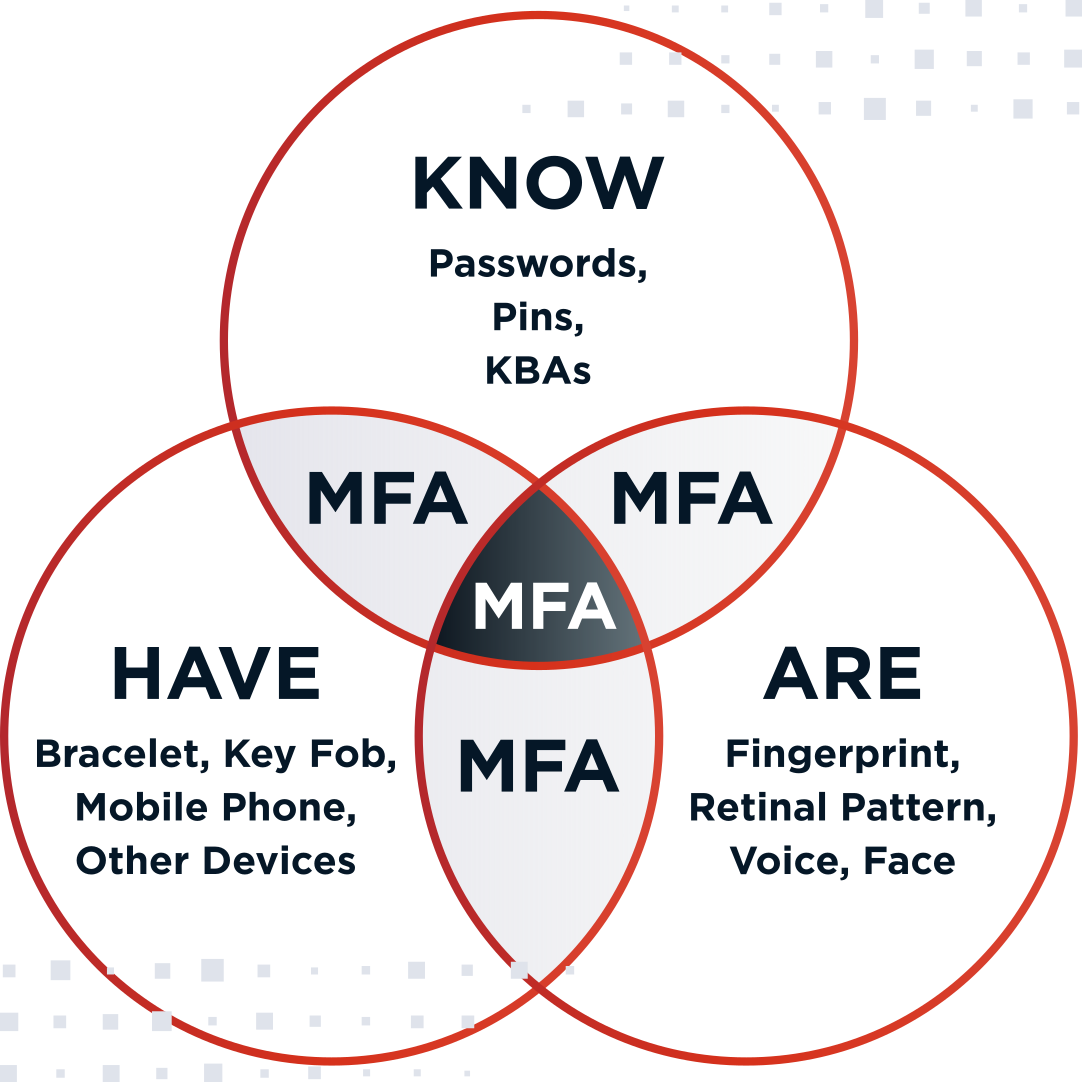
Requiring adaptive MFA adds a critical layer of security. Even if an attacker cracks a password, they cannot access the account without an additional verification factor. Factors should come from at least two categories:

Multifactor authentication categories
  • Something You Know: Passwords, PINs, or challenge responses.

  • Something You Have: A phone for push notifications or a hardware token.

  • Something You Are or Do: Biometrics such as fingerprints, facial recognition, or voice recognition.

When users authenticate with factors from at least two categories, confidence increases and stolen passwords become far less useful. Beyond security, MFA can improve user experiences and reduce password-reset-related helpdesk costs.


To learn more about best practices related to deploying an MFA solution in your organization, check out The Ultimate Guide to MFA.


Best: Passwordless Authentication

Passwordless authentication can eliminate the password guessing vector entirely. Instead of shared secrets that can be guessed or reused, users authenticate with factors such as passkeys, FIDO security keys, or biometrics. For a deeper overview, see this introduction to passwordless authentication.


Implement Account Lockouts and Rate Limiting

Organizations should implement policies that limit repeated failed login attempts. Account lockouts after a defined threshold, plus progressive delays between attempts, can slow automated guessing without permanently locking out legitimate users.


Detecting Brute Force Attempts

Monitoring is essential. Security teams should watch for patterns such as repeated failures across many accounts, spikes in login traffic, attempts against nonexistent usernames, and unusual geographic access. Pair alerting with controls that can challenge or block automation, including tooling designed to detect automated attacks and non-human users.

The Role of Threat Detection in Prevention

Regardless of your authentication method, threat detection is critical. Since these campaigns rely on automation, organizations need solutions that can distinguish between human users and bots. Advanced threat protection analyzes behavior, device reputation, and network signals to identify non-human traffic. When integrated into the authentication flow through no-code journey orchestration, these tools can block automated password crackers in real time.

Brute Force Protection for Enterprises

Enterprises face unique challenges due to scale, legacy applications, and a distributed workforce. Protection in this environment requires centralized visibility and consistent identity controls. Strategies should include:


  • Unified Identity Management: Centralizing access control through identity lifecycle management to enforce consistent policies across applications.

  • Adaptive Authentication: Stepping up verification based on risk signals such as a new device or unusual location.

  • API Security: Using application and API access enforcement to protect interfaces that automated tools target to bypass browser-based login forms.

Take Action Against Brute Force Attacks

To secure your organization, start by auditing password policies and enforcing MFA wherever possible. Then plan a path toward passwordless authentication to reduce reliance on shared secrets that attackers can guess.


Ping Identity protects organizations from these attempts by combining advanced threat protection, no-code journey orchestration, adaptive MFA, identity lifecycle management, secure single sign-on (SSO), and passwordless authentication to help organizations build, test, and optimize seamless and secure UX.


Frequently Asked Questions

It is an automated guessing method that tests many possible credentials until one works. Success depends heavily on weak or reused passwords.

Yes. In most jurisdictions, attempting to gain unauthorized access is illegal. In the United States, it often violates the Computer Fraud and Abuse Act (CFAA).

They can be effective against weak passwords and unprotected login flows. They become far less effective with MFA, rate limiting, and bot detection.

"123456" remains one of the most commonly compromised passwords, with other predictable choices like "password" also frequently abused.

It depends on password length, character variety, and attacker resources. Some weak passwords can fall quickly, while strong passphrases can resist for years.

Brute force tries many character combinations, including random ones. Dictionary attacks use lists of common words and known passwords, making them faster but less exhaustive.

Share this Article:
Related Resources

Start Today

See how Ping can help you deliver secure employee, partner, and customer experiences in a rapidly evolving digital world.