What is Privileged Access Management (PAM)?

Jan 6, 2022
-minute read
Director of Tech Alliances

Privileged access management is a top cybersecurity priority for enterprises. According to Gartner, "nearly every successful security breach involves a failure of privileged access management (PAM)." PAM is an important part of any security strategy. Read on to learn more about PAM and its importance.


Privileged access refers to the access or power granted to certain users above that of standard users to protect access to systems and sensitive data. Privileged access allows organizations to secure their infrastructure and applications, run business efficiently and maintain the confidentiality of sensitive data and critical infrastructure. Privileged access can be granted to human users or programmed applications. Types of privileged accounts include:


  • Administrative accounts, including system, local and domain administrators
  • Emergency accounts (also known as breakglass or firecall accounts)
  • Service accounts
  • Application accounts
  • Domain service and directory accounts


Privileged accounts with the broadest abilities are known as superuser accounts. They have unrestricted capabilities, including the ability to implement system changes, access all files and directories, install software and delete data.

Privileged Access Management vs Privileged Account Management vs Privileged Session Management

Here is a quick explanation of terms you may encounter and how they compare to privileged access management.


  • Privileged access management refers to the processes and tools used to secure, control and monitor privileged access to an organization's critical resources and data.


  • Privileged account management is related to managing and auditing account and data access by privileged users.


  • Privileged session management is used to observe, manage, document and monitor a privileged user from the time a privileged session begins until that session ends.

Why is Privileged Access Management (PAM) Important?

Privileged accounts are high-value targets for cybercriminals. "In 85% of the privileged credential theft instances, cybercriminals were able to access critical systems and/or data," a recent study by ThycoticCentrify found. In addition to outside bad actors stealing credentials, company insiders were found abusing administrative privileges to illegitimately access critical resources.


Standard user accounts have limited access when access controls are in place. Privileged accounts provide access to the most sensitive and mission-critical parts of the enterprise, which is why privileged account management is so important in preventing internal and external bad actors from compromising your organization. PAM can be used to disable multiple attack vectors, protecting against internal and external attacks.


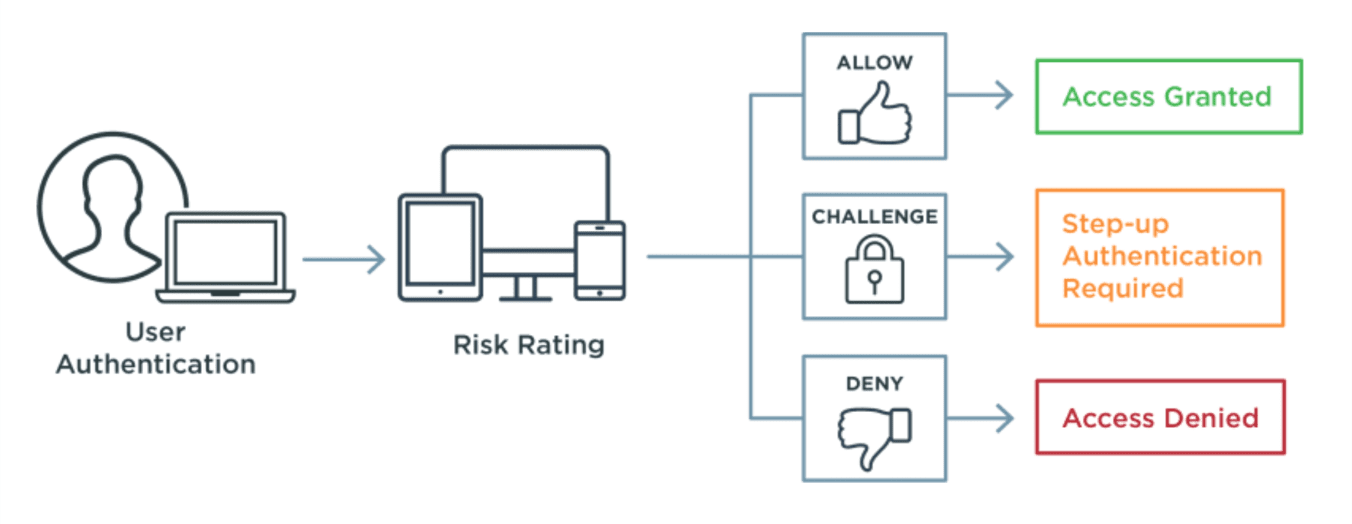
Privileged access management is used in conjunction with identity and access management (IAM) solutions, which will be discussed in more detail below. IAM requires users to authenticate and prove they are who they claim to be before access is granted to resources, with risk-based multi-factor authentication adding layers of security.


What are the Benefits of Privileged Access Management (PAM)?

Privileged access management solutions reduce the risk and scope of security breaches. Privileged users keep your organization running smoothly, from upgrading services to overseeing IAM solutions to making sure domains are protected for DDoS attacks. Having that type of access and power over your network is why privileged user accounts are such attractive targets for bad actors. Taking over superuser accounts, with unlimited power to execute commands and make system changes, has the greatest potential for exploitation and abuse.


Top benefits of PAM include:


Improve Security, Operational Performance and Reliability

PAM serves as a deterrent to bad actors and can improve insights into vulnerabilities, network inventory and identity governance. Restricting access to key resources, systems and processes to privileged accounts increases accountability and helps reduce the risk of downtime.


Fewer Attack Vectors and Faster Assessment of Damage

By limiting privileges to a minimal number of people, processes, and applications, bad actors have fewer attack vectors. For example, malware often requires privileged access to install or execute. Should an attack occur, a PAM solution lets you quickly audit privileged accounts, see where changes were made, and identify compromised applications and processes.


Regulatory Compliance

Privileged access management helps create a more compliant, audit-friendly environment. Many regulations require least privilege access policies to ensure proper data stewardship and systems security, including the Health Insurance Portability and Accountability Act of 1996 (HIPAA).


Easily Manage Privileged Account Lifecycles

Regular review of every user and account with privileged access, including third-party contractors, reduces the risk of security breaches. If role-based access control is used, make sure new users are added to privileged accounts and former employees and/or contractors are quickly removed.

How Does Privileged Access Management (PAM) Work?

Privileged access management solutions offer the ability to monitor, report and record privileged access activity. This allows administrators to keep track of privileged access and identify where it may be being misused. Administrators should be able to easily identify anomalies and potential threats so that they can take immediate action to limit damage. Ideally, the PAM solution will have an in-built alert system to bring any unexpected activity to an administrator's attention.


Privileged access management operates on the principle of least privilege, so even privileged users are only allowed access to what they need. Privileged access management tools are elements of the wider PAM solution designed to target and address various challenges involved in monitoring, protecting and managing privileged accounts.


PAM tools can be used to:


  • Identify, manage and monitor privileged accounts across systems and applications.
  • Control access to privileged accounts, including access that may be shared or available during emergencies.
  • Create randomized, secure credentials, including passwords, usernames and keys, for privileged accounts.
  • Provide two-factor and multi-factor authentication.
  • Restrict and control privileged commands, tasks and activity.
  • Manage credential sharing across services to limit exposure.

What is the Difference between Privileged Access Management (PAM) and Identity and Access Management (IAM)?

Let's start with what they have in common. Identity and access management (IAM) and privileged access management (PAM) work together to secure an enterprise's resources. Both PAM and IAM limit access to resources using the principle of least privilege, where permission is limited to only those resources needed by that user. For example, IAM access controls can ensure sales teams are able to access CRM systems, but not the HR department's confidential personnel files. PAM controls help ensure a local administrator does not have access to the same resources as a superuser account. Both IAM and PAM also help eliminate the need to manually on-board and off-board users with automated provisioning. Just-in-Time (JIT) privileges serve as an additional layer of security by granting access only for a specific purpose and/or for a limited period of time.


According to IBM's Cost of a Data Breach Report 2021, "The most common initial attack vector, compromised credentials, was responsible for 20% of breaches at an average breach cost of USD 4.37 million." Enterprises need solutions that protect all users from having their compromised credentials used, including privileged administrators of critical infrastructure, data and applications. Organizations are moving to the Zero Trust approach to security, where you should trust no one and verify everyone, especially users with privileged access. Both IAM and PAM are part of the Zero Trust security approach.


[MUSIC] Hey, welcome to this fast chat exploring why zero trust starts with identity.
I'm Black Hat contributing editor Alex Wawro and with us today is Baber Amin, CTO west for Ping Identity.
Baber, thanks for joining us.
>> Thank you, Alex.
>> All right, let's get right into it.
I think first let's ask like what are the essential components of zero trust?
And why is identity key?
>> So, well the one essential component of zero trust is identification right?
If you don't know who somebody else is, then, you're you're starting off on the wrong foot.
And that's one of the reasons why identity is key.
Because you're not relying on any discrete events anymore.
You're not relying on any discrete mechanisms, but it's more of continuously verifying and and evaluating trust in the person or the device or the process.
>> So what are some easy wins for people who are looking to get started with zero trust?
>> So we get asked that a lot, right and I always tell people look, again start with proofing, so making sure that who it is from before you give somebody a credential and then move to authentication.
Then move to access and then move to consolidating your data stores.
Like a lot of people think, let me just consolidate my data stores.
And you know that project takes forever and it never succeeds because it never finishes.
>> Yeah.
So what type of companies do you think would benefit most from a zero trust approach?
>> Well, I used to say that you know, if you have a lot of people that are remote workers, they would benefit the most.
But given that everybody is remote now, I say everybody can benefit, because without zero trust, which is really a bad name for this, right?
Because it's not like you don't trust anything it's that you don't trust anything by default, right in a static manner, so a better name would be maybe ephemeral trust or something like that.
But everybody benefits from that, especially nowadays when you have all folks working remotely in giving things like telehealth or even the proofing that a doctor can prescribe you medicine they have to go through a certain amount of proofing.
That they are credentialed and everything else so that that used to be all in person, new employees.
Right?
>> Right.
>> When you get a new employee on board, you check their authorization to work the I9 form all of that, that used to be in person.
So all of that has to be remote now too, so pretty much everybody benefits from implementing zero trust principles.
>> So, besides technologies like what are the key things people need to know about the people and processes required for zero trust?
>> Yes.
So that's another place where people think that zero trust is some silver bullet and if I implement these four things, and yay, I'm good to go.
[LAUGH] But security is a people problem and a people solution.
The worst thing in security and the biggest hole in security is the combination of the person, email and clicking on links.
Because that violates no matter what kind of firewalls you put up no matter what kind of gates you put up.
It's that one person who didn't think about it or just clicked on it, right?
So that's the weakest link.
So processes become very important because it's educating your folks.
Look, don't do this or, don't connect to systems, don't download information to your machine that is not a possibly have the same level of security or patches on it right?
Don't download super secret documents to grandma's PC that has never been patched for the last 10 years.
And just because you need to work on something right after Thanksgiving dinner.
That is if we get to go to grandma's house this year.
So, yeah, people, processes, education and in really getting that buy in from your organization is very, very important.
>> Yeah, that makes a lot of sense.
Well Baber, thank you so much for joining us today and thanks everyone for taking part.
>> Thank you, Alex.
[MUSIC]


 

Identity and Access Management (IAM)

Identity and access management (IAM) is a security framework that allows organizations to authenticate users and control their access rights. IAM solutions are available for an enterprise's customers, workforce and partners. While its capabilities are broad in scope, IAM typically refers to authorization and authentication, including:


  • Single sign-on (SSO) gives users the ability to sign on once and with a single set of credentials to gain access to multiple services and resources


  • Multi-factor authentication (MFA) provide a greater level of assurance of a user's identity by requiring the user to provide two or more factors as proof of identity


  • Access management to make sure the right people are able to access the right resources and nothing more.


Privileged Access Management (PAM)

Privileged access management (PAM) focuses on privileged users to monitor and control their access to servers, cloud applications and APIs, DevOps, databases, directories and other resources.

Privileged Access Management (PAM) and Identity and Access Management (IAM) Support Each Other

The combination of privileged access management and identity and access management makes your enterprise more secure. PAM and IAM share a role in supporting and protecting each other. IAM helps provide seamless, secure access for privileged users. PAM solutions help secure the credentials for IAM administrators and privileged users. Users are first authenticated using single sign-on, then multi-factor authentication is applied given the sensitive nature of these users' access requests, which protects the privileged accounts.

What are Privileged Access Management (PAM) Best Practices?

Adhering to best practices allows you to protect your systems and get the most out of your PAM solution. Gartner lists its four pillars of PAM as follows:


  1. Track and secure every privileged account
  2. Govern and control access
  3. Record and audit privileged activity
  4. Operationalize privileged tasks


Those pillars can be broken down into the following PAM best practices:


  • Always authenticate users. Prevent bad actors from accessing accounts using compromised credentials before they have the opportunity to enter your network, using identity verification, two-factor authentication, multi-factor authentications or other tools.


  • Adhere to the principle of least privilege. Make sure all accounts are only authorized to access the resources they actually need and nothing more, including privileged accounts.


  • Keep PAM solutions current. Make sure privileged account lists are comprehensive and updated. Consider temporary access where needed rather than perpetual access. Also ensure PAM applications are kept up-to-date.


  • Automate where possible. Streamline operations and automate tasks where possible, which reduces the risk of human error and may prevent bad actors from interfering with processes.


  • Monitor, log and audit all privileged accounts. Privileged accounts can make or break your organization. Continuously monitor and log privileged account activity, and audit logs for insights, potential risks and anomalies.


  • Educate privileged users with documented policies and procedures. Privileged users need training on policies, procedures and systems. Provide ongoing training on applications, processes, threats and trends.

Share this Article:
Related Resources

Start Today

See how Ping can help you deliver secure employee, partner, and customer experiences in a rapidly evolving digital world.