
Choosing the Best YubiKey for Enterprise Authentication

Feb 6, 2025
-minute read
Last Updated: Aug 13, 2026
Headshot of Becky Park
Director of Product and Solution Marketing
Illustration of a hand touching a YubiKey hardware security key next to an open laptop

Choosing the best YubiKey for enterprise authentication starts with understanding why passwords and text codes leave gaps. Attackers exploit these gaps through phishing, SIM swaps, and social engineering. Credential abuse appears in 39% of all breaches across the full attack chain, according to the 2026 Verizon Data Breach Investigations Report.1


Layering on MFA helps reduce risk. YubiKey authentication goes further by tying access to a physical device. This guide explains where it fits alongside passwordless authentication and how to pick the right key.


Key Takeaways


  • YubiKey authentication uses a physical hardware security key, making enterprise logins resistant to phishing, SIM swaps, and credential theft.
  • Unlike text codes or authenticator apps, a YubiKey stores no personal data and cannot be phished or copied over a network.
  • The YubiKey 5 Series suits most enterprise teams, while FIPS models fit government and heavily regulated environments.
  • Registering a backup key and setting a PIN are essential steps before rolling out YubiKeys at scale.
What Is a YubiKey?

A YubiKey is a small hardware security key. It plugs into a USB port or taps against a phone over NFC to confirm who is signing in. We see the same appeal repeatedly: it needs no battery, no network connection, and no software agent to do its job.


For a workforce identity program, that makes it a practical upgrade from two-factor authentication codes users must type.


Each key holds a unique cryptographic secret. The user inserts it and presses the metal contact, or taps it over NFC, to complete a login.


You can confirm which apps work with a given key on the YubiKey marketplace integration page. This is a useful first check when you formalize your enterprise MFA best practices.


Models cover USB-A, USB-C, Lightning, and NFC, and they support open standards including FIDO2, WebAuthn, FIDO U2F, one-time password (OTP), OpenPGP 3, and smart card.

How YubiKey Authentication Works for Enterprise Teams

This method relies on public-key cryptography rather than a shared secret an attacker can steal. During setup, the key generates a private key that never leaves the device and registers a matching public key with the service.


At login, the service sends a challenge. The key signs it with the private key, and the browser confirms the request came from the real site. Because the signature is bound to that site's origin, a lookalike phishing page cannot reuse it.


Origin binding is why hardware keys resist phishing, SIM swapping, and man-in-the-middle attacks that defeat text and app-based codes. For a large organization, the payoff is fewer account takeovers across a distributed workforce.


CISA's 2025 guidance calls FIDO authentication the strongest form of MFA and identifies hardware-based FIDO security keys as the most effective option where feasible.2 Enterprise adoption is accelerating: an estimated 5 billion passkeys are now in use worldwide, and 68% of organizations have deployed or are actively deploying them.3


The 2025 NIST Digital Identity Guidelines require agencies to use phishing-resistant authentication. They point to WebAuthn as a way to achieve it, while classifying one-time passcodes and push notifications as not phishing resistant.4


The model also fits places where phones are restricted, such as manufacturing floors, hospitals, trading desks, and government facilities. You can layer YubiKey authentication onto your existing multi-factor authentication without replacing your identity provider.

YubiKey vs. Other Authentication Methods

Every second factor raises the bar over a password alone, but they differ sharply in how well they resist a determined attacker. The table below compares common methods with a hardware security key.


The common thread is that most methods still rely on something typed, stored, or transmitted, and each of those can be intercepted. A hardware key removes that shared secret, which is what makes it phishing-resistant MFA rather than just another factor.

Choosing the Best YubiKey for Enterprise Authentication Needs

There is no single best YubiKey for every organization. The right model depends on your compliance requirements, the devices your workforce uses, and whether you want passwordless or second-factor logins.


When choosing the best YubiKey for enterprise authentication, the 5 Series is the most common starting point. It supports single-factor passwordless, second-factor, and PIN-based multi-factor logins across the widest range of devices.


Regulated organizations usually add the FIPS models to meet government standards. If you want the background on the underlying standards, see our guide to one-time passwords and the fundamentals of FIDO2 and WebAuthn.

Where YubiKey Authentication Is Supported

Many of the largest online services accept hardware keys, so a single YubiKey can protect several enterprise accounts.


  • Google: second-factor sign-in for Gmail, YouTube, and Maps in Chrome and Firefox.
  • Facebook: second-factor sign-in on any supported browser or operating system.
  • Dropbox: protects both the account and the content stored in it.
  • Password managers: Bitwarden, LastPass, KeePass, and Password Safe pair a master password with a key.

How to Set Up Your YubiKey

A YubiKey works out of the box, and the exact steps vary by provider. Most enterprise rollouts follow the same three stages.


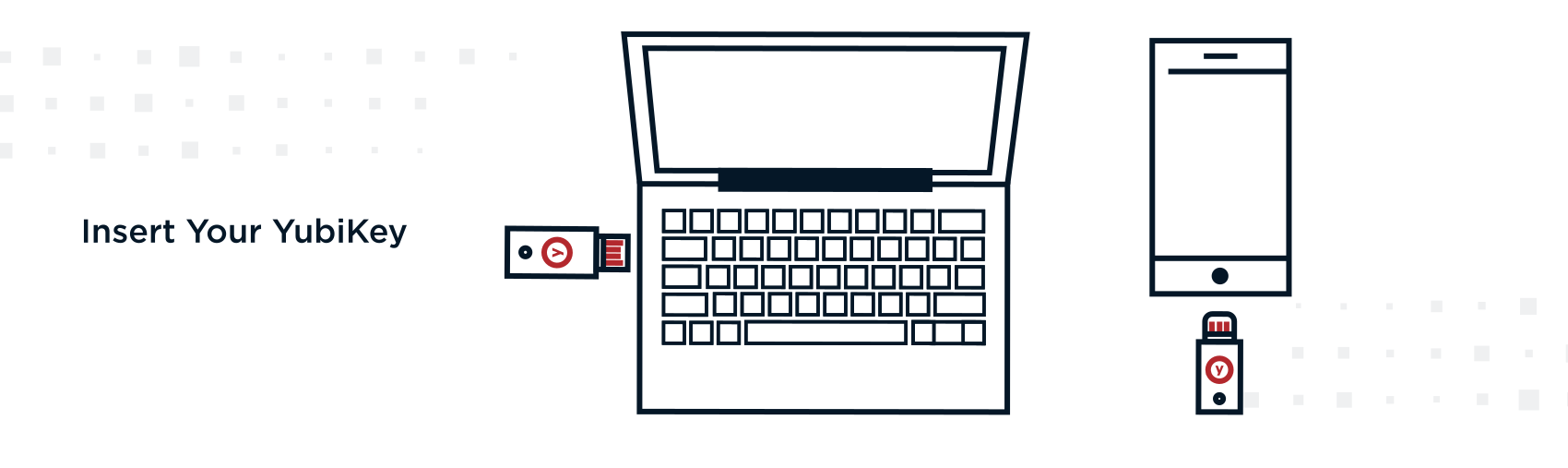
Insert your YubiKey

Connect the key using the port it supports, whether that is USB-A, USB-C, or Lightning, or hold it near the device for an NFC tap.


Graphic reading Insert Your YubiKey showing lineart illustrations of a YubiKey security key being plugged into a laptop and a smartphone


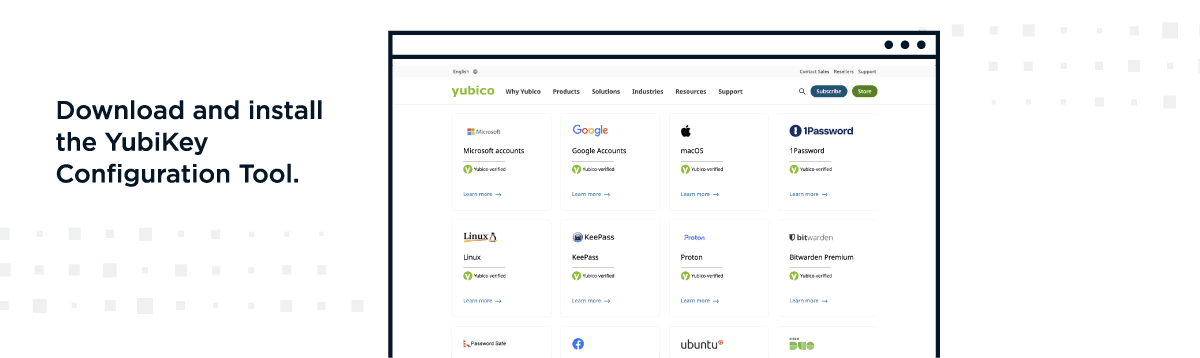
Install the YubiKey configuration tool

Download and install the configuration tool, apply the latest patches, and register each key with your services. Use the Works with YubiKey catalog to confirm compatibility, register two keys per account, and set a PIN before adding services.


Graphic reading Download and install the YubiKey Configuration Tool alongside a web browser screenshot of Yubicos integration directory showing supported platforms like Microsoft Google macOS and 1Password


Set up a PIN

Some keys require a PIN for an added layer of protection. Set it during configuration, then reinsert the key to confirm it works.


Graphic reading Set Up a PIN displaying a browser window with a YubiKey icon above entry fields for PIN and Confirm PIN

YubiKey Security Best Practices

A hardware key is only as strong as the habits around it. These practices keep enterprise deployments resilient.


  • Secure the physical key: treat it like a house key, and store spares in a safe place.
  • Enable PIN protection: set a PIN of six to eight digits through the key manager.
  • Create backups: register two keys per account so a lost key never locks a user out.
  • Turn on two-factor authentication: pair the key with a second factor for higher-value access.
  • Record recovery codes: store the codes generated at setup in an encrypted file or a locked safe.
  • Verify URLs before you tap: check the site address and the LED blink pattern to avoid phishing.

Strengthen Enterprise MFA with YubiKey Authentication

YubiKey authentication is strongest as part of a broader identity strategy. Ping Identity helps large enterprises pair hardware keys with adaptive multi-factor authentication and passwordless authentication, so a stolen credential alone cannot take over an account.


PingID supports YubiKey through Yubico OTP and FIDO2 or U2F, and administrators can enable it in the service configuration. To get started, see how to set up YubiKey with PingID and review the YubiKey authentication settings. These controls also help reduce account takeover fraud across the workforce.


1 2026 Data Breach Investigations Report — Verizon, May 2026

3 Mobile Communications Best Practice Guidance — CISA, Version 2.0, November 2025

3 State of Passkeys 2026 — FIDO Alliance, May 2026

4 SP 800-63B-4: Digital Identity Guidelines — NIST, 2025


Frequently Asked Questions

The main downside of a YubiKey is that it is a physical object. It can be lost, forgotten, or damaged, which is why registering a backup key matters.


It also carries an upfront hardware cost per user. Not every application supports it yet, though coverage keeps expanding.

YubiKey is not strictly better than a passkey, because a YubiKey can itself store and act as a passkey. A hardware key keeps the credential on a separate device you control, while a synced passkey moves across your phones and laptops.


The right choice depends on whether you value portability or device-bound assurance.

Yes, a YubiKey is highly secure because it uses public-key cryptography and stores no personal data an attacker can extract remotely. The signing secret never leaves the device, so it cannot be phished, guessed, or copied over a network.


Logging in requires physical possession of the key.

Share this Article:
Related Resources

Start Today

See how Ping can help you deliver secure employee, partner, and customer experiences in a rapidly evolving digital world.