Identity is checked at key moments like login, payments, and password resets, but too often these checks are treated as isolated steps rather than a connected defense. As attackers grow more sophisticated, it is no longer enough to know what an account can access, you need to continuously verify who is behind it. This is the foundation of a Verified Trust approach, where identity is validated at every critical moment instead of just once.

Identity Verification vs. Authentication vs. Authorization
Mar 7, 2022
-minute read
Last Updated: Apr 28, 2026

Key Takeaways
-
Identity is continuous: Identity verification, authentication, and authorization should work together as a continuous trust model—not isolated steps.
-
Authentication vs. authorization: Authentication proves who is operating an account right now; authorization determines what they can access.
-
Trust must be re-established: Identity should be re-verified at key “doors” like login, transactions, recovery, and helpdesk—not assumed after a single check.
-
Modern authentication wins: Combining biometrics and trusted devices delivers stronger, phishing-resistant security with better user experience.
The Identity Lifecycle: From Claim to Continuous Trust
Identity isn’t a one-time event. It’s a journey. At a high level, that journey includes:
-
Identity Verification – Can you prove who you are?
-
Authentication – Are you still that person right now?
-
Authorization – What are you allowed to do?
Traditional models treat these as separate checkpoints. A Verified Trust model connects them, ensuring that trust is continuously reinforced across onboarding, access, approvals, recovery, and helpdesk interactions.
What Is Identity Verification?
It’s about proof. It answers:
“Can you prove you are who you say you are?”
This step typically happens during onboarding and may involve:
-
Government-issued IDs (driver’s license, passport)
-
Biometric checks, such as selfies with liveness detection
-
Verified contact points like phone numbers or email
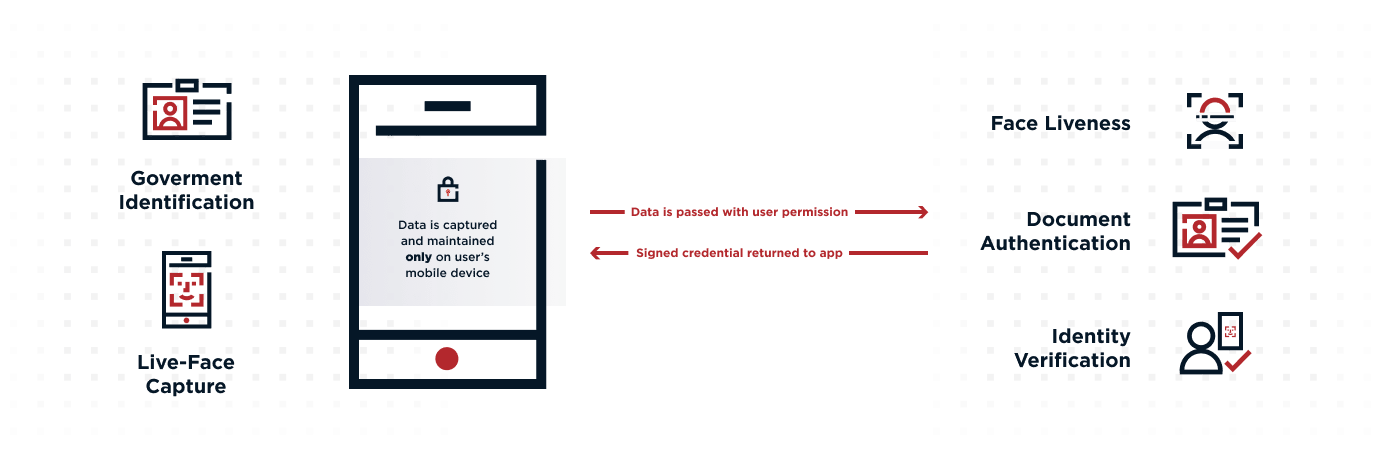
Verification is critical for stopping fraud at account creation. For instance, identity proofing that matches a selfie to an official ID has proven highly effective in preventing attackers from using stolen identities.
But here’s where modern approaches evolve:
Verification shouldn’t be a one-and-done event.
In a Verified Trust model:
-
Verification results become reusable signals
-
They can be referenced later during high-risk actions
-
Users don’t need to repeat the entire process every time
This creates a stronger, more seamless experience where trust established during onboarding continues to support decisions later in the journey.
What Is Authentication?
Authentication is how systems continuously confirm identity. It answers:
“Is this still the same verified person right now?”
Unlike verification, authentication is ongoing.
It happens whenever a user tries to do something meaningful or risky, such as:
Logging in
Approving a transaction
Accessing sensitive data
Changing account details
Recovering access from a new device
These are the “doors” in a user journey—moments where trust should be actively re-established, not assumed.
Authentication Factors
Authentication relies on three types of factors:
Something you know – passwords, PINs
Something you have – devices, tokens
Something you are – biometrics like facial recognition or fingerprints
Multi-factor authentication (MFA) combines these for stronger protection. However, not all MFA is equal.
The most secure approaches avoid shared secrets (like passwords) and instead rely on combinations like:
Trusted device + biometric (e.g., face scan)
This pairing is far more resistant to phishing, credential theft, and account takeover.
Adaptive Authentication
Modern systems also incorporate risk-based, adaptive authentication, which evaluates context such as:
Location
Device reputation
Time of access
Behavioral patterns
If something looks unusual—like a login from a new country or device—the system can step up authentication requirements in real time.
In other words, authentication isn’t static. It continuously adjusts based on risk.
What Is Authorization?
Authorization determines what a user can do after authentication. It answers:
“Now that I know who you are, what are you allowed to access?”
This includes:
-
Permissions
-
Roles
-
Access policies
For example:
-
An employee logs in (authentication)
-
They can only access specific systems based on their role (authorization)
Authorization ensures users only interact with the data and systems they’re entitled to, even if their identity is valid.
Authentication vs. Authorization: The Key Difference
These two concepts are often confused, but they serve very different purposes:
-
Authentication confirms identity
-
Authorization grants access
Think of it this way:
-
Authentication is unlocking the front door
-
Authorization is determining which rooms you can enter
Both are essential, but authentication must come first. Without strong authentication, authorization decisions are built on shaky ground.
Real-World Example: A Payment Journey
Let’s look at how this works in practice:
-
Identity Verification – You create an account with your personal details and the bank confirms your identity using ID and biometrics
-
Authentication – You approve a payment using your face and trusted device
-
Authorization – The bank checks whether you’re allowed to send that amount
In an example Verified Trust model, authentication at step two is directly linked back to the verified identity established earlier, ensuring continuity of trust across the journey.
Why Continuous Trust Matters More Than Ever
Cybercrime continues to grow, with billions lost annually to fraud and account takeover attacks.
At the same time, user expectations are rising. People want:
-
Fast, seamless access
-
Minimal friction
-
Strong privacy protections
Balancing these demands requires more than isolated security controls.
It requires a continuous trust model that:
-
Re-validates identity at key moments
-
Adapts to changing risk
-
Connects onboarding, authentication, and access decisions
Strengthening Authentication Without Adding Friction
Passwords alone are no longer sufficient. They’re easily stolen, reused, and phished.
Modern authentication improves both security and user experience by combining:
-
Biometrics (something you are)
-
Trusted devices (something you have)
This creates a phishing-resistant approach that:
-
Eliminates reliance on shared secrets
-
Reduces user friction
-
Strengthens identity assurance
Privacy-First Authentication
Advanced approaches also protect user privacy through techniques like:
-
No centralized storage of biometric data
-
Cryptographic verification methods
-
User-controlled identity signals
This ensures strong security without compromising sensitive personal data.
Build Security Around Verified Trust
Identity is something you continuously prove.
By unifying identity verification, authentication, and authorization into a single, connected model, organizations can:
Reduce fraud and account takeover risk
Improve user experience across journeys
Make smarter, context-aware access decisions
Evaluate Your Fraud Prevention Strategy
Discover 10 essential questions to assess and optimize your threat protection approach.
Frequently Asked Questions
Authentication verifies who a user is, while authorization determines what they’re allowed to access. Authentication must happen first before any access decisions are made.
-
Identity Verification proves a users identity (usually during onboarding)
-
Authentication continuously confirms that the same person is operating the account
Verification typically happens once. Without ongoing authentication, systems can’t ensure the same verified person is still accessing the account, leaving room for account takeover.
The strongest methods combine phishing-resistant factors, such as a trusted device and biometrics (like facial recognition). These approaches eliminate reliance on passwords and significantly reduce attack risk.


Related Resources
Start Today
Contact Sales
See how Ping can help you deliver secure employee, partner, and customer experiences in a rapidly evolving digital world.