- Is your current MFA approach equipped to stop AI-driven phishing, credential theft, impersonation, and social engineering?
- Can you strengthen security in the right moments and in real time without impacting UX?
- Which MFA methods give you the right balance of protection, usability, and adaptability?
Use this white paper to compare today’s MFA methods, understand their tradeoffs, and build a stronger, smarter MFA strategy.
Why MFA Best Practices Need an Update
With attackers utilizing AI to scale phishing, credential theft, impersonation, and social engineering faster and more convincingly than ever, understanding the limits of legacy multi-factor authentication (MFA) strategies built around passwords and one-size-fits-all second factors. In this environment, MFA best practices are no longer just about adding another prompt at login. They are about applying stronger, more adaptive authentication that can resist modern attacks, reduce unnecessary friction, and build confidence across every critical user interaction.
MFA still blocks the vast majority of password-based compromise, but AI has increased the success rate of attacks targeting human and session layers, so phishing-resistant MFA and conditional access are now the real standard.
This paper explores how MFA best practices are evolving in response to AI-driven threats. It compares today's most common authentication methods, explains where each approach delivers the most value, and outlines how organizations can combine phishing-resistant authentication, contextual signals, and modern capabilities such as biometric and device-based verification to improve both security and usability. It also shows how these decisions contribute to a broader Verified Trust approach, where trust is continuously reinforced rather than assumed once at login.
What Modern MFA Best Practices Must Address
Traditionally, authentication mechanisms or factors have been categorized as belonging to one of three groups:
- Something you know (for example, a password or a PIN).
- Something you have (for example, a mobile phone or a token).
- Something you are (for example, a fingerprint or other biometric data).
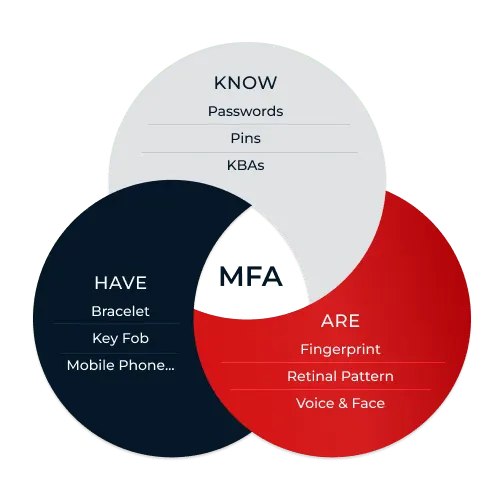
These three authentication categories are the most frequently used. You may also encounter additional classifications such as something you are doing, somewhere you are, or time, but keep in mind that these are essentially elements or sub-factors of the existing three main categories. For example, location or somewhere you are (GPS) is tied to a device or wearable in your presence, which ultimately is something you have.
When authentication factors were first introduced, they added an extra level of assurance that the user was who they said they were. But no factor is foolproof on its own, because each type of factor (and authentication mechanism within that factor) has its own specific strengths and weaknesses. To keep bad actors from exploiting those weaknesses, companies began adopting two-factor authentication (2FA), where a user is required to provide two different factors to authenticate. The goal here was to force an attacker to have to compromise two different channels to take over an account, and this mechanism provided a massive increase in security over previous authentication methods.
Unfortunately attackers did not stand still, and invented a variety of ways to compromise multiple factors. Before we get into how to thwart those attacks, let's put these newer risks into context. 2FA—any 2FA, even password+SMS—is so much more secure than username/password that if you have not implemented it, you should stop reading this paper and do so immediately. Using 2FA versus single factor authentication (SFA) is table stakes for authentication in today's environment, as it materially increases the attacker's effort and its rate of compromise is far lower than SFA/password-based authentication alone.
But once you have a baseline level of protection in place, it's time to turn your thinking from 2FA to MFA. Technically MFA just means "multi-factor authentication," and in theory it could simply be the same 2FA that you are already using. It could also involve three, four or really any number of factors, chosen from the three basic categories.
What's important is that modern MFA best practices address five priorities:
- Resistance to AI-driven phishing, credential theft, impersonation, and social engineering
- Low friction for legitimate users
- Adaptive responses based on context, device, and risk
- Protection across authentication, enrollment, recovery, and high-value transactions
- Higher-assurance verification when risk increases
Increasingly, organizations are also adopting privacy-preserving verification approaches, such as zero-knowledge biometrics, as part of a broader Verified Trust model that continuously evaluates confidence in a user's identity, device, behavior, and intent rather than assuming trust after a single login.
Comparing MFA Best Practices: Strengths & Weaknesses

Something You Know: Knowledge Factors
Knowledge factors such as passwords, PINs, and security questions still appear in many authentication flows, but they are no longer strong enough to anchor MFA best practices on their own. That does not mean organizations can eliminate passwords overnight. It means modern MFA best practices should treat knowledge factors as a starting point, then strengthen them with phishing-resistant methods, device signals, adaptive policies, and stronger verification when risk rises.
For most organizations, the goal is not simply to replace every password immediately. It is to reduce dependence on knowledge factors in the moments that matter most, including login, step-up authentication, account recovery, and high-value actions. The strongest MFA strategies combine usability with stronger assurance by keeping routine access low-friction while requiring additional verification when context or risk changes.
Passwords
Passwords are the most common knowledge-based factor—and they're notoriously risky. Often it isn't the passwords themselves that are the problem, but rather users' password practices. Long and randomly generated single-use passwords are extremely secure, but they're also hard to remember. This is where the poor practices come into play, such as the use of easily guessed passwords like "123456" or "letmein."
Poor practices also include the use of the same password or other knowledge-based information on multiple sites, which opens up even more risk. Even if a site has excellent security, that security is only as good as the weakest system when credentials used across other sites are compromised. Additionally, reuse, phishing, credential stuffing, and AI-assisted social engineering have made them easier to steal and abuse at scale.
Stolen credentials often end up on the dark web for resale, where they can be obtained by attackers. This has led to the rise of account takeovers via botnet attacks, where stolen lists of usernames and passwords are replayed against websites looking for matches. The attackers don't have to be successful very often since even a 2% success rate means that in a system with 1,000 users, an attacker may be able to compromise 20 accounts. In order to improve password security, best practice is to check new or updated passwords against a list of known stolen or compromised passwords.
Also of importance is how a company manages passwords. Even the hardest-to-guess password can be vulnerable if it isn't hashed with a private seed, stored centrally and concealed from the system where the user is logging in. When passwords are transferred or stored in the clear, they're at increased risk of being stolen and used for account takeover. This doesn't just apply to passwords either. Any stored knowledge-based factor increases exposure, which is why stronger MFA strategies shift assurance toward phishing-resistant methods, device context, biometrics, and adaptive verification.
Password Usability
Passwords remain common, but modern MFA best practices recognize them as a weak foundation because phishing, reuse, credential stuffing, and AI-assisted social engineering have made them easier to compromise at scale. Simple, easy-to-remember passwords are usable, but in addition to the credential-stuffing attacks mentioned above, they are vulnerable to brute force dictionary or common password list attacks. Long passwords are more secure but become less usable, especially if they must be updated frequently. This lack of usability can result in increased password resets, support calls, password sharing among sites and the other usability and user friction issues we mentioned at the beginning of this paper.
PIN
A PIN is a shorter version of a knowledge factor. They are typically numeric only and 4 to 6 digits long. Obviously a 4- or 6-digit PIN is much more susceptible to brute force than passwords, as there are only 10,000 or 1,000,000 possible combinations, respectively. As such, a PIN would be a poor choice as the sole factor protecting a website and should never be stored in a central location. But if the PIN is used solely to unlock a mobile application, it would take a long time for someone to brute force the PIN. If a lockout happens after a certain number of bad entries, or increased delays occur between each subsequent entry, security is improved even more.
PINs are relatively simple to implement, but their security value depends heavily on whether they are used locally on a trusted device and protected by retry limits or lockouts. PINs can offer a fast, familiar user experience, but usability alone is no longer enough to justify their use as a meaningful factor in higher-risk authentication flows. However, PINs are in general a solid, local-only stored first factor in a low-risk, multi-factor scenario.
KBA
Another common way to confirm an individual's identity is with knowledge-based authentication (KBA), which requires consumers to provide answers to questions that, theoretically, an attacker would not know. KBA should no longer be treated as broadly interchangeable with passwords, and if it is used at all, it should be limited to narrow recovery or edge-case scenarios backed by stronger signals. There are two kinds of KBA: shared answers and dynamic KBA. With shared answers, the organization provides a list of questions, and the user provides the answer as part of a registration process. When challenged with the question, the user must provide the correct answer. Typically, if the user enters the wrong answer, they are asked a different question, as repeatedly being asked the same question could make it too easy for an attacker to guess the answer. The problem is, whether KBA relies on shared answers or dynamic questions, answers are often easy to find, infer, or socially engineer from public information, breach data, and AI-assisted research.
Dynamic KBA may be less predictable than shared-answer questions, but it still struggles to provide durable assurance in a threat environment shaped by large-scale data exposure and automated fraud. The challenge with this method is it is difficult to find questions that are both not public knowledge and reasonably easy to answer. For example, asking someone to remember their exact mortgage payment two refinancings ago is unlikely to result in a positive customer experience.
KBA Security
KBA is no longer a strong modern authentication option because public data, breach data, and AI-assisted social engineering make many answers easier to discover or infer. Many KBA questions are based on information that criminals can easily find on social media sites or through other public sources with ease by leveraging AI. And since KBA answers are centrally stored, they must be encrypted and never transmitted in the clear during authentication.
KBA Usability
From a usability standpoint, it's common for a consumer to fail their own KBA quiz, resulting in a negative customer experience. While KBA may still be available across channels, broad availability alone is no longer enough to justify its use as a meaningful trust signal, and if it is used at all, it should be limited to narrow recovery or edge-case scenarios backed by stronger signals or step-up methods. As such, KBA can have its place in scenarios like account recovery.
Something You Have: Possession Factors
Possession factors are effective only when organizations also plan for device loss, device change, and recovery without weakening the overall authentication flow. Because these are common occurrences, any system using a possession factor needs to have a fallback plan. Case in point: A large consulting provider reports that on any given day, somewhere between several hundred to more than a thousand employees either lose their phones or forget to bring them to work. Since the enterprise has stringent security requirements for access to sensitive applications, this results in hundreds if not thousands of daily phone calls to the helpdesk to manually validate the employee and issue temporary credentials.
Possession Factor Security
Possession factors can provide strong security, but their effectiveness depends on the method, since OTPs, push prompts, and other device-based factors can still be exposed to phishing, relay attacks, approval fatigue, or device compromise.
Possession Factor Usability
From a usability standpoint, possession factors are rated high. Responding to a push notification on your phone, plugging a FIDO authenticator into a USB port or clicking on a temporary link in an email are all relatively convenient. Which one is the best choice depends on the particular scenario.
RSA and OATH Hardware Tokens
RSA and OATH tokens are small hardware devices that the owner carries to authorize access to a network service. The device may be in the form of a smart card, or it may be embedded in an easily carried object such as a key fob or USB drive. The device itself contains an algorithm (a clock or a counter) and a seed record used to calculate the pseudorandom number, and users enter this number to prove that they have the token. The server that's authenticating the user must also have a copy of each key fob's seed record, the algorithm used and the correct time. Some hardware tokens are equipped with a USB interface, and these tokens are inserted into the PC's USB slot. When the user needs to authenticate, they press a key on the device, which generates a one-time passcode (OTP) and emulates a keyboard to send the passcode to the server, as if the user had entered it by hand.
Hard FIDO Authentication Tokens
Hard FIDO tokens are also small hardware devices. They can interface with your computer via USB, Near Field Communication (NFC) or Bluetooth Low Energy (BLE). Highly effective against phishing attacks, FIDO authentication requires that the user register the authenticator for each website that they want to authenticate with. The authenticator generates a unique public/private key pair for a specific website and returns the public key to that website. Authentication is only allowed over TLS, and the key is bound to the website's domain. Therefore, if the user is subsequently phished to a fake website, the authentication request will fail since the attacker is not coming from the registered website domain. FIDO support is now widely available across major browsers, operating systems, and device platforms, which has removed much of the compatibility friction that once slowed adoption.
The cost of FIDO authenticators has traditionally been a barrier, and enterprises typically only require and distribute FIDO authenticators for select groups of people and for applications with the highest security needs. But major mobile platforms from Android and Apple are building support for soft FIDO authenticators, which are software-based and can leverage the phone's biometric capabilities such as fingerprint or facial recognition. Because there is no additional cost to use these authenticators, mass adoption of FIDO authentication is much more feasible economically. Soft FIDO authenticators are covered below in the section on biometric authentication.
One-Time Passcodes (OTP)
OTPs remain widely used because they are flexible and familiar, but modern MFA best practices treat them as a convenience-oriented option rather than the strongest form of authentication. This method helps verify control of a delivery channel or device, but they do not by themselves provide strong assurance that the right person is present. They're also time limited, and servers can restrict the number of instances a user can attempt to enter the correct OTP. They can reduce the success of password replay and credential stuffing, but they are still vulnerable to phishing, relay attacks, and real-time interception.
OTPs can still be intercepted or replayed through real-time phishing proxies, which is why modern MFA best practices increasingly prioritize phishing-resistant methods for higher-risk access. Phishing proxies allow attackers to set up phishing sites using domain names that are similar to real websites. These sites look like the real site since they are actually proxying traffic to and from the legitimate site, and can inspect and change any information they wish in real time. A user who has been convinced that a phishing site is a legitimate site will enter the OTP into the phishing site, which can then use the OTP code to log in to a legitimate site in real time. The strength of an OTP depends less on the code itself than on the security of the delivery channel, device, and surrounding authentication flow. We will cover security considerations of the different OTP methods in the individual sections below, starting with soft tokens.
OTP Application / Soft Tokens
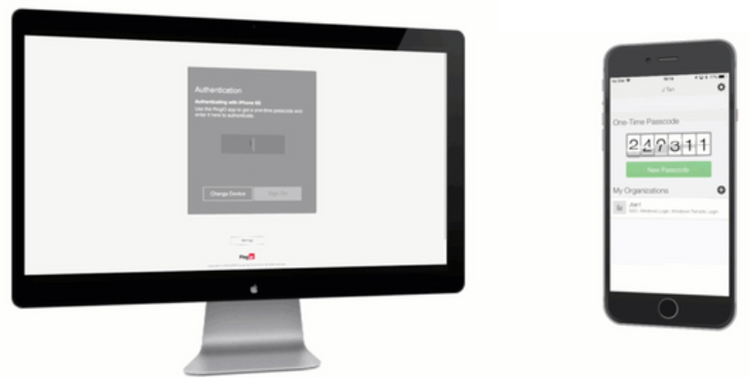
Soft tokens are a software-only variant of the RSA/OATH tokens. They use the same interface as the hard tokens, so a single server-side implementation can leverage both hard and soft tokens. The software provides a rolling series of OTPs and can run as a mobile or desktop application.
As far as security goes, in practice soft tokens are less vulnerable to loss than hard tokens. Mobile users are more likely to lose a single-use hardware token than they are to forget or lose their phones, and when they do lose a phone, they are more likely to report the loss and the soft token can be disabled. Soft tokens are also easier and less expensive to distribute than hardware tokens, which need to be shipped.
Push Notification
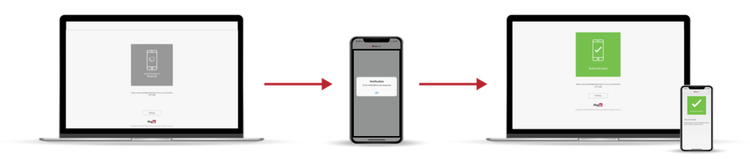
Push notifications can provide a low-friction second factor, but modern MFA best practices must account for approval fatigue, prompt bombing, and the risk of users approving fraudulent requests. The capabilities of the applications can vary widely.
Push-based MFA is easy to use, but it must be designed to resist prompt bombing and accidental approval through stronger context, number matching, or additional verification signals. Users are often so bombarded with notification requests that they simply approve every one of them. This trait works to the advantage of hackers who have compromised the first factor during a login process, because they know that some percentage of users will submit the second factor on the attacker's behalf when they receive a push notification.
OTP via SMS
SMS OTP remains widely available, but it is now best treated as a lower-assurance fallback because of SIM swapping, number porting, and phishing risk. While the SMS OTP option has the advantage of not requiring a user to own a modern smartphone that supports mobile applications, it has several disadvantages around number porting and SIM swapping. This has been prevalent enough that NIST has deprecated SMS usage. So while it's a good option to offer consumer-facing OTP via SMS for less security-critical access, organizations should consider whether its security is sufficient for higher-value enterprise logins.
OTP via Voice
One method of OTP delivery is via phone call to a number already associated with a user. This method is highly available as all it requires is a phone. It will work when no mobile phone is present, or via land line when no cell coverage is present. But from a security perspective, it is vulnerable to SIM swapping if on a mobile device, or potential abuse if a phone is shared among multiple people.
OTP via Email
OTP delivered via email is a viable second factor. It loses usability points since it requires the user to switch to their email application from whatever application they were authenticating to, and either remember the OTP code or copy and paste it into the authenticating application. Because of these limitations, email-based OTP is typically used for resetting forgotten passwords, where the user can prove they own the email account by responding to a time-limited link within the email.
From a security standpoint, email is only as secure as the credentials that are used to gain access to it. You should never allow email to be the backup mechanism for multiple MFA factors. Say, for example, you were to allow email OTP to be the fallback for a forgotten password, as well as the fallback option for a lost device, with the email protected by only a single factor. In this case you wouldn't have true multi-factor authentication, since the attacker simply needs to compromise one thing (the email account) to break into the user's account.
Something You Are: Biometric Factors
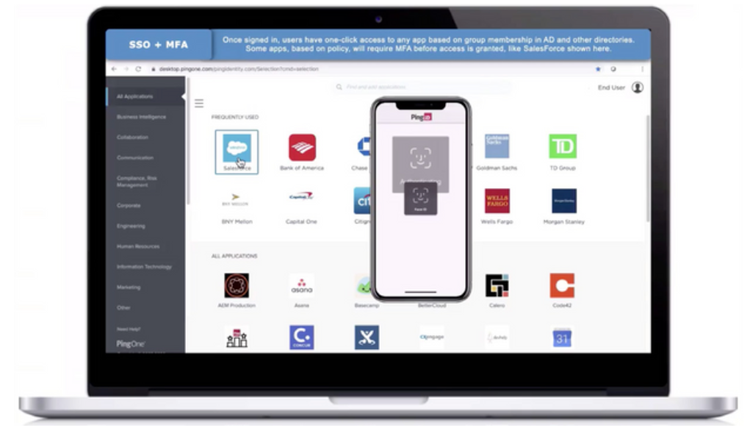
Biometric factors remain popular because they can combine strong security with low friction, especially as newer approaches such as zero-knowledge biometrics make it possible to add privacy-preserving biometric authentication and re-verification at critical moments like login, step-up, transaction approval, and account recovery. Fingerprint readers are now standard on almost every smartphone and laptop. Windows Hello offers integration with biometric devices, while newer devices such as the iPhone X and the Microsoft Surface Book 2 provide built-in facial recognition features. These platform-provided capabilities can be easily utilized as part of an authentication flow.
Biometric Security
Biometrics can provide high assurance, but modern MFA best practices increasingly depend on how biometric verification is implemented, protected, and combined with device and contextual signals. Fingerprint verification can be highly accurate, but the more important question today is whether the biometric flow can resist spoofing, device compromise, and presentation attacks in real-world conditions. Facial recognition technology has also made enormous strides in accuracy, but modern deployments must account for AI-enhanced spoofing and deepfake-assisted impersonation with strong liveness detection and higher-assurance verification controls.
Biometrics have some weaknesses, however. From a security standpoint, if the biometric is tied to a device, for example, then it is subject to the same forgotten-device issues that a possession factor is. Storing the biometric on a central server eliminates that problem, but you must take care with this type of data as it is considered personally identifiable information (PII) under regulations like GDPR and CCPA. Many organizations are exploring privacy-preserving approaches such as zero-knowledge biometrics, where biometric information is never stored in a retrievable or reconstructable form in order to meet or exceed regulatory compliance requirements. In the United States, Texas, Illinois and Washington have passed laws concerning the collection and sharing of biometric information, and several other states have proposed similar regulations.
Biometric Usability
Usability issues with biometrics also vary widely, depending on the use case. For example, a fingerprint reader would be a poor choice for verifying patients at a flu clinic. Similarly, facial recognition isn't reliable if the lighting cannot be controlled. One study of facial recognition-equipped ATMs found that accuracy fell dramatically in the afternoon for machines facing windows with western exposure, because the reflection of the setting sun on those windows completely washed out the facial recognition images.
Biometrics and the Platform FIDO Authenticator
FIDO remains one of the strongest defenses against phishing because authenticators are bound to trusted domains and cannot be easily replayed through lookalike sites or real-time phishing proxies.
Platform FIDO authenticators are now built into major operating systems and devices, which has significantly reduced deployment friction and improved accessibility. The user registers the FIDO authenticator with websites that support the WebAuthn standard via the browser. When the website requests authentication, the user authenticates to the phone the same way they always do: with PIN, fingerprint or facial recognition. This provides a powerful combination of security and ease of use. Apple supports using external FIDO authenticators (hard FIDO tokens) to authenticate via WebAuthn to browser-based applications running on the Mac and iPhone over Bluetooth Low Energy or USB. Apple, Google, and Microsoft now support platform-based FIDO experiences that let users authenticate with built-in biometrics such as Face ID, Touch ID, or device-native biometrics across supported apps and browsers. This allows users to log into websites that support the WebAuthn standard.
FIDO has become a broadly practical, phishing-resistant authentication option for both workforce and customer use cases, thanks to wider platform support and lower-friction user experiences.
How to Choose the Right MFA Methods
Choosing the MFA mechanisms that are best for your particular situation requires balancing security, usability and cost. The table below attempts to summarize the strengths and weaknesses of different MFA mechanisms.
How Adaptive MFA Strengthens Security
We have been talking a lot about authentication categories and the different mechanisms within those categories. Modern MFA is no longer just about collecting factors at login; it is about applying the right level of trust at the right moment. By combining MFA with context, device, behavior, and transaction signals, organizations can move toward a broader Verified Trust model that adapts authentication to the risk of each interaction. The premise is to dynamically assess the risk of a given operation based on:
- The user's current authentication status
- The risk associated with the resource in question
- The context of the request
This allows us to provide better usability and greater user convenience by skipping additional authentication factors when the risk is low, e.g., when a user is logging in on a managed device from a frequently used IP address at the same time of day they typically sign on.
Adaptive MFA uses contextual signals to detect when behavior, device posture, or transaction details fall outside the norm and then steps up verification only when confidence drops. Examples include users logging in for the first time from an unmanaged device, logging in from San Francisco an hour after they logged in from Paris, logging in from an IP address with a poor IP reputation, or attempting to complete a transaction over $100,000. In those moments, organizations can raise assurance with additional verification that matches the risk without forcing every user through the same level of friction.
As shown in the image below, to be granted access to some resource, a user authenticates with a factor such as a password. At the time of authentication, the system also collects and checks authentication signals. Only if those checks identify something unexpected and anomalous is the user asked to authenticate with the second factor before being granted access. And if the risk is too high, your authentication policy may decide to not allow access at all, or to only allow access with reduced privileges.
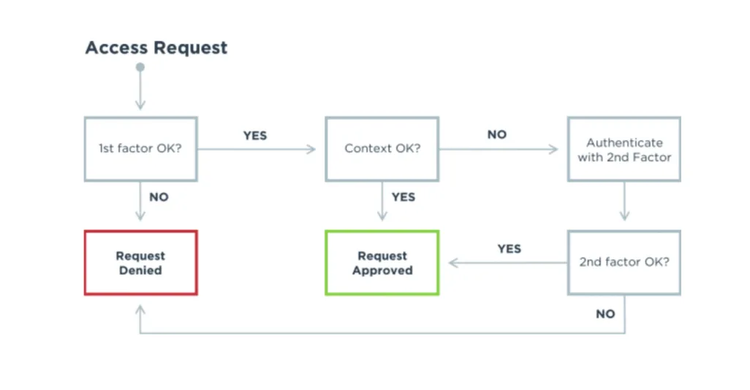
Risk-based step-up MFA is triggered by atypical and anomalous context or behavior. It's only when the context collected via the first authentication factor indicates something unexpected that a second factor of authentication is requested before access is granted.
Modern MFA best practices rely on more than static factors alone by using contextual and risk signals to continuously evaluate confidence in a user, device, and session.
Modern MFA Best Practice Recommendations
It is clear that organizations must continue to evolve beyond password-centric and legacy MFA approaches. In today's threat environment, baseline 2FA is still the floor, but modern MFA best practices increasingly require phishing-resistant authentication, adaptive policies, and stronger verification when risk rises. Based on our evaluation of current and emerging technologies, and discussions with customers, partners and other stakeholders, we make the following recommendations:
- Prioritize phishing-resistant authentication. As AI-driven phishing and impersonation attacks become more convincing and scalable, organizations should move beyond OTP-dependent strategies and adopt FIDO-based authentication, passkey experiences, and platform authenticators wherever possible.
- Use biometric authentication where it meaningfully improves both assurance and user experience, especially when paired with FIDO or other phishing-resistant methods. Privacy-preserving approaches such as zero-knowledge biometrics can also help organizations strengthen login, step-up, transaction approval, and recovery flows without increasing reliance on centrally stored secrets or reconstructable biometric data.
- Offer multiple authentication options, but not all options should carry the same level of trust. The strongest MFA strategies give users flexible paths for access and recovery while reserving higher-assurance methods for higher-risk interactions.
- Ensure recovery paths do not weaken assurance. If users can reset or recover multiple factors through the same low-assurance channel, you have effectively collapsed MFA back to a single point of failure.
- Account for non-mobile and constrained-access scenarios. Provide authentication options that still work when users do not have reliable mobile access, cannot receive messages, or are operating in offline or restricted environments.
- Use adaptive MFA policies to evaluate context, device, behavior, and transaction risk in real time. This moves MFA toward a broader Verified Trust model, where organizations reduce unnecessary friction for low-risk activity and raise assurance only when confidence in the user, device, or intent changes.
Fraud Prevention Is More than Just MFA
Discover how future-proof your entire security strategy. Get the Ultimate Guide to Online Fraud Prevention.
1 Harvard Business Review, AI Will Increase the Quantity—and Quality—of Phishing Scams
At Ping Identity, we make it possible to trust every digital moment across customers, employees, partners, and non-human identities. Whether you're securing millions of users, fighting fraud, simplifying third-party access, or going passwordless, establishing trust shouldn't slow you down. Our enterprise-grade identity platform is built for scale, speed, and flexibility and works seamlessly with your existing cloud, hybrid, and on-prem environments. We help you confidently embrace AI and automation with Runtime Identity, so you can continuously verify the identity, context, and intent of every AI agent and control their actions in real time. With Ping, all digital experiences start with trust. Learn more at pingidentity.com.